
Troubleshooting SMS Delivery
It’s frustrating when a text never arrives—whether it’s an appointment reminder, a promotion, or a two-way chat. This guide walks you through each step of our delivery pipeline, shows you where things can go wrong, and gives you clear, actionable fixes so you can get back on track fast.
How Message Delivery Works
When you send a message from Patient Copilot, it travels through multiple layers:
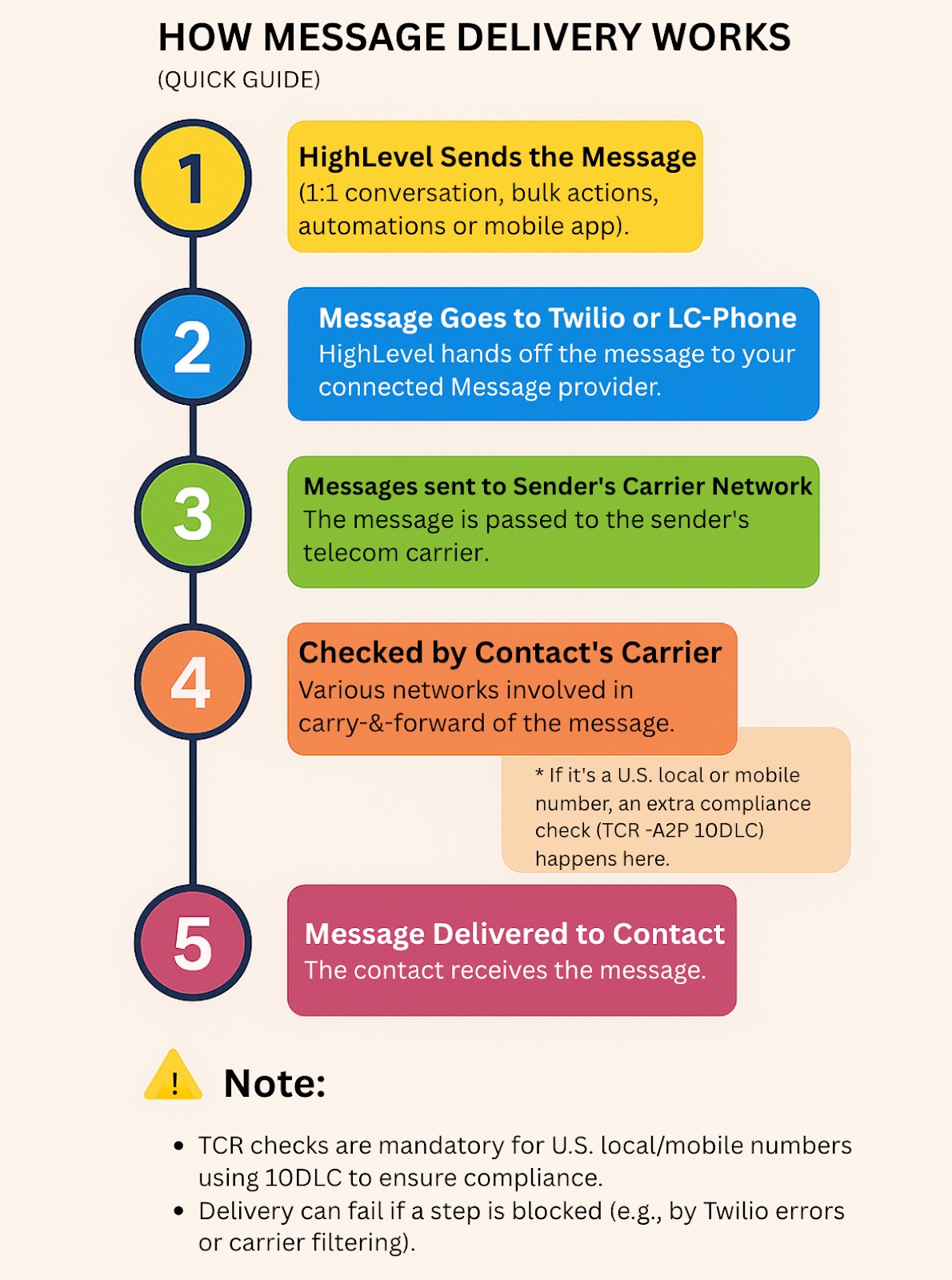
If the message fails at any layer, it may not be delivered to the end user. Let’s look at how to spot these issues and fix them.
Where to Find Error Messages in Patient Copilot
If your message didn’t go through, check the Conversations View. In most cases, when a message fails to send or deliver, we display an error in the conversation view that appears like this:
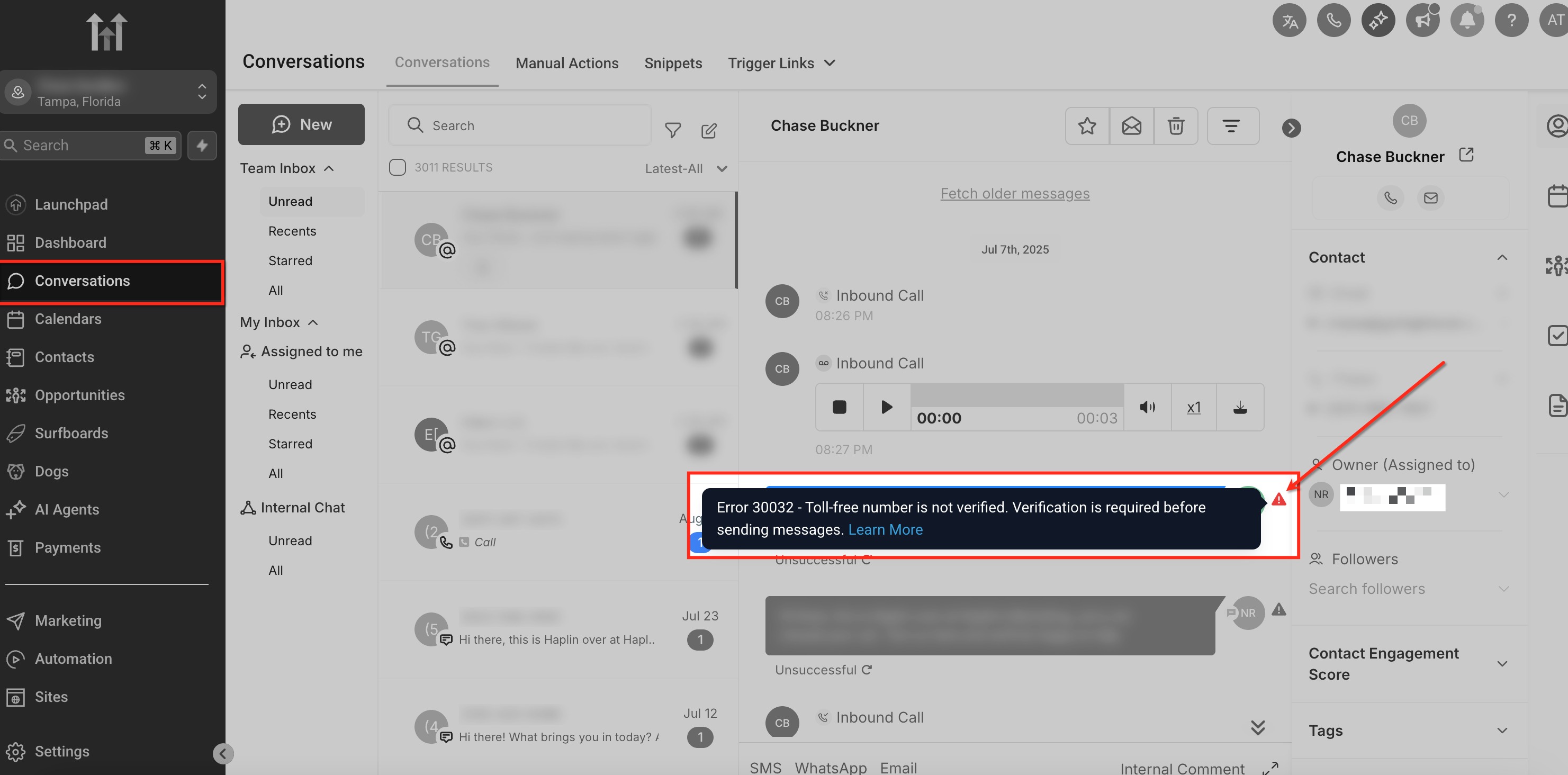
The error message and error code will provide you with clues about what is going wrong and how to proceed from there.
Common Reasons Why Messages Fail (And How to Fix Them?)
1. At the Patient Copilot Layer
| Issue | Cause | Fix (Help docs) |
|---|---|---|
| Contact has DND (Do Not Disturb) enabled | When DND is enabled for a contact on the message channel or overall, Patient Copilot doesn’t send the message and displays an error in the conversation screen. | Remove DND status from the contact to resume message sending. ➡️ DoNotDisturb DND |
| --- | --- | --- |
| The Number Is a Landline | When number validation is enabled, the system checks if a number is message-capable (i.e., not a landline). If not, it prevents the message from being sent. | Use a mobile number instead or disable number validation if necessary. ➡️ Number Intelligence |
| --- | --- | --- |
| Sub-Account is New and Undergoing Ramped Sending | Patient Copilot restricts message volume for new sub-accounts to prevent spam, gradually increasing limits over time. | Wait for limits to increase automatically, or have the agency request a lift. ➡️ Phone System Messaging Policy (check Ramp-Up Model: section) |
| --- | --- | --- |
| Sub-Account Has Hit Its Daily Message Limit | Each sub-account has a daily message limit set by the agency. Bulk and automated messages stop sending once this limit is hit, but individual replies can still be sent. Agencies have control over these limits for each sub-account. | Adjust daily limits from the agency settings, or wait until the next day. ➡️ Phone System Messaging Policy |
| --- | --- | --- |
| Sub-Account Sending Suspended Due to High Errors, Opt-Outs, or Complaints | Sub-accounts exceeding spam, opt-out, or carrier complaint thresholds have message sending suspended. Attempts to send messages during suspension will be skipped and display an error. | Follow deliverability best practices and contact support if needed. ➡️ Best Practices for Deliverability |
2. At the Twilio/Phone System Layer
? Error | Cause | Fix |
Number is on Twilio’s DND list | The number is on Twilio’s DND list due to a previous opt-out or carrier complaint. Messages will fail unless the contact opts back in. | The contact must text “START” to the same Twilio number to re-enable messaging. |
30001: Queue Overflow | Messages are queued based on the sender’s or account’s rate. If they stay in the queue for over 4 hours, they fail. | Reduce the Validity Period in Messaging Service settings or API requests to shorten queue time. |
30002: Suspended Sub-Account | The message fails if the Twilio sub-account is suspended between queuing and sending. | Contact Twilio or Patient Copilot Support to resolve the suspension. |
3. At the Sender Carrier Network Layer
Error | Cause | Fix |
30003: Unreachable Destination Handset | The recipient’s phone may be off, have no signal, be a landline, or there may be a mobile carrier issue. | Retry later or verify the number is a mobile line and properly reachable. |
30004: Message Blocked | Possible reasons messages might not be sent or delivered to contacts include: The destination number is blocked, the device has insufficient signal or cannot receive message (e.g., landline), the number is on India’s Do Not Call registry, there’s a mobile carrier issue, or a US/CA toll-free number was sent to a handset that previously opted out. | Ensure the number is valid and opted in. Avoid sending to DND or blocked numbers. |
Attachment File Too Large | The file size exceeds carrier limits for MMS. | |
International Geo Permissions | Your account might not have permission to send international messages.. | Contact support. |
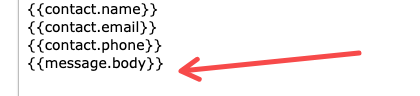
Message Body Too Long | - If you are using a trigger to send a message. Check the body of the message. Also, check to see if there is a custom value of {{message.body}} - For example, if someone replies via email and their email exceeds the limit of 1600 characters, the message will not send if you have the custom value {{message.body}}
| Trim the message manually or modify the trigger logic to exclude large custom values. |
Super-Quick Checklist Before You Click “Send”
- Check Conversations: Note any red error badge.
- Match Error Code: Use the tables above to find the cause.
- Apply Fix: Follow the “Fix” column for that issue.
- Retry: Resend the message after adjustments.
- Monitor: Confirm delivery or note a new error code
Frequently Asked Questions
Q: Why am I getting charged for failed message messages?
Charges apply once a message is attempted—even if it fails later in the process. **Q: How do I know exactly why a message failed?**You can check the message logs in Twilio. ➡️ How to check Twilio logs
Related Articles
- Best Practices for SMS deliverability and Avoiding SMS Restrictions
- LC - Phone Messaging Policy
- SMS / Phone number Validation Was this article helpful? That’s Great! Thank you for your feedback Sorry! We couldn’t be helpful Thank you for your feedback Feedback sent We appreciate your effort and will try to fix the article