
Workflow Trigger - Trigger Link Clicked
Overview The Trigger Link Clicked trigger initiates a workflow whenever a specific trigger link is clicked by a contact. This feature is ideal for tracking link engagement and automating subsequent actions based on user interactions with predefined links.
Trigger Name Trigger Link Clicked
Trigger Description
This trigger starts a workflow when a contact clicks on a specified trigger link. Trigger links can be used in emails, SMS, or other communication channels. The workflow is activated only for the contacts who click the specified link, making it a powerful tool for targeted engagement.
How to Configure
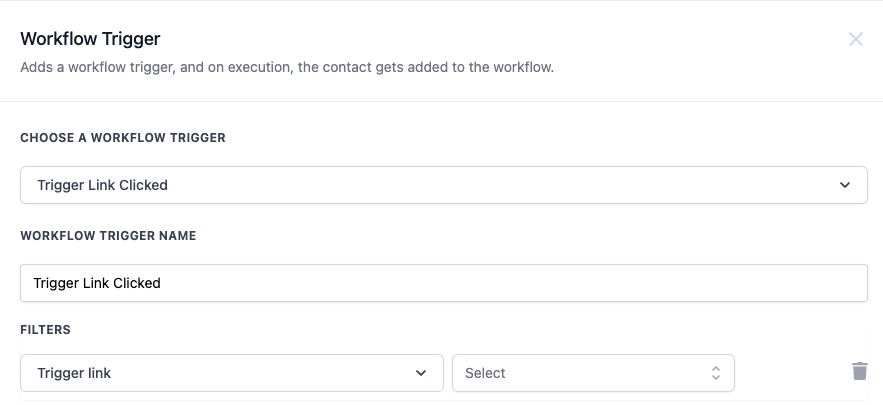
- Choose a Workflow Trigger: Select Trigger Link Clicked from the list of available triggers.
- Workflow Trigger Name: Enter a descriptive name for your trigger, such as “Promo Link Clicked” or “Survey Link Engagement.”
- Filters: Use filters to specify which trigger link will activate the workflow. You can select the exact trigger link from the dropdown menu to narrow down the workflow activation.
Value Description Mandatory Trigger link Selects the specific link that will trigger the workflow when clicked by a contact. Yes
Example You want to create a workflow that sends a follow-up email to contacts who click on a promotional link sent via email.
- Workflow Trigger Name: “Promo Link Engagement Follow-up”
- Filters:
- Trigger link: “Spring Sale Promo” (Only clicks on this specific link will trigger the workflow) Workflow Steps:
- Trigger: Trigger Link Clicked (as configured above)
- Action: Send Email - Send a follow-up email thanking the contact for their interest and offering a special discount.
- Action: Update Contact - Tag the contact as “Interested in Promo” to segment these users for future promotional campaigns. Was this article helpful? That’s Great! Thank you for your feedback Sorry! We couldn’t be helpful Thank you for your feedback Feedback sent We appreciate your effort and will try to fix the article