
Workflow Trigger - Task Added
Overview
The Task Added trigger allows you to initiate a workflow whenever a new task is added to a contact’s record. This is useful for automating actions based on task creation, such as notifying the assigned user, updating task-related fields, or sending follow-up messages.
Trigger Name Task Added
Trigger Description
This trigger is activated when a new task is added to a contact’s record. You can use filters to specify which tasks should start the workflow, such as tasks assigned to a particular user or tasks containing specific keywords.
How to Configure
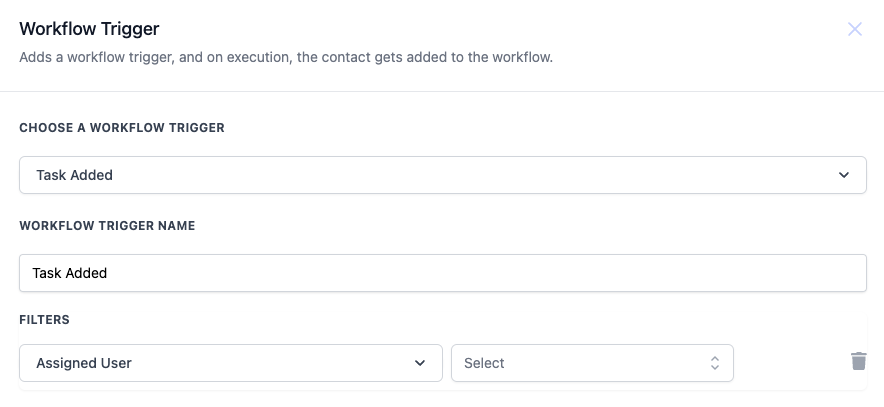
- Choose a Workflow Trigger: Select Task Added from the list of available triggers.
- Workflow Trigger Name: Enter a descriptive name for your trigger, such as “Task Added.”
- Filters: Use filters to refine when the trigger should activate. This allows you to specify which tasks should start the workflow based on the assigned user.
Value Description Mandatory Assigned User Selects specific users to trigger the workflow when a task is assigned to them. You can choose one or multiple users. No
Example
You want to create a workflow that triggers when a new task is added and is assigned to a specific user. The workflow will then send an email to notify the user about the new task.
- Workflow Trigger Name: “New Task Assigned”
- Filters:
- Assigned User: “John Doe” (Only trigger if the task is assigned to John Doe) Workflow Steps:
- Trigger: Task Added (as configured above)
- Action: Send Email - Notify the assigned user about the new task.
- Action: Update Task Status - Mark the task as “Notified.” Was this article helpful? That’s Great! Thank you for your feedback Sorry! We couldn’t be helpful Thank you for your feedback Feedback sent We appreciate your effort and will try to fix the article