
Workflow Action - Update Appointment Status
Overview The “Update Appointment Status” action changes the status of an appointment associated with the contact in the workflow. This action can update an appointment to a new status, such as confirmed, cancelled, or showed. If the workflow was triggered by an appointment-related event (like “Appointment” or “Customer Book Appointment”), it will automatically update the status of the appointment that triggered the workflow. Otherwise, it will update the most recent appointment for that contact.
Action Name Update Appointment Status
Action Description
This action changes the status of an existing appointment in the workflow. The action updates the status for the relevant appointment, depending on how the workflow was triggered (via appointment-related events or other triggers). It ensures that the most up-to-date information is reflected in the appointment’s status.
Action Details
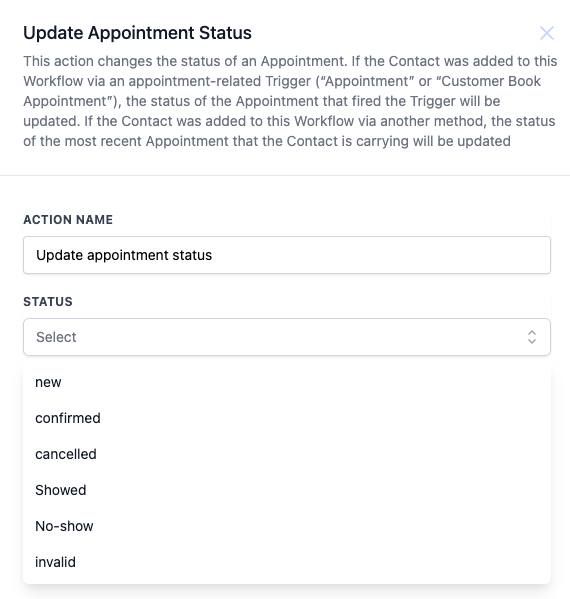
How to Configure 1. Action Name: Set the name of the action (e.g., “Update Appointment Status”).
- **Status:**Select the desired appointment status from the dropdown. Options include:
- New - Confirmed - Cancelled - Showed - No-show - Invalid
- This action will update the status of the appointment that triggered the workflow or the most recent appointment for the contact.
Field Name Description Mandatory Status The new status that the appointment will be updated to (e.g., New, Confirmed, Cancelled, Showed, No-show, Invalid). Yes
Example Consider a scenario where a customer cancels their appointment. This action can be used to automatically update the appointment status to “Cancelled.” Alternatively, if a customer showed up for their scheduled appointment, the status can be updated to “Showed” to reflect that the appointment was attended.
Additional Notes
- This action is useful for automating follow-up tasks based on appointment status changes.
- Ensure that the workflow is triggered by an appointment-related event to update the correct appointment.
- Always double-check the selected status before saving the workflow to avoid incorrect updates to the appointment status. Was this article helpful? That’s Great! Thank you for your feedback Sorry! We couldn’t be helpful Thank you for your feedback Feedback sent We appreciate your effort and will try to fix the article