Resend Campaign Visibility & Control
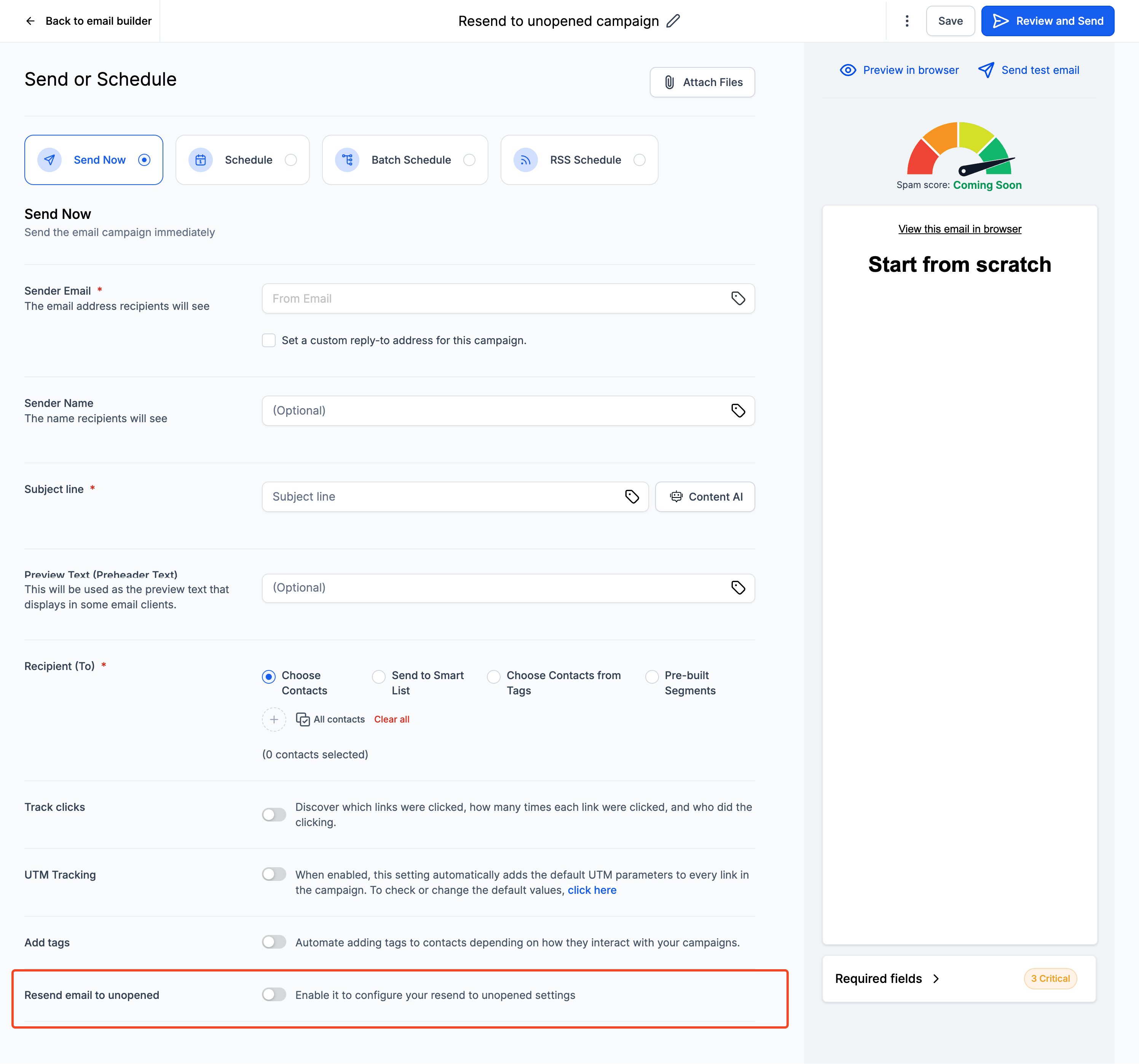
This article explains how to automate and manage resend campaigns in Patient Copilot, enabling you to pre-configure resends for unopened emails, track them easily, and edit or cancel them before they go out. Improve your email engagement with smarter campaign strategies. ## What is Resend Campaign Visibility & Control? This feature improves how you manage resending emails to contacts who didn’t open the original email. You can now pre-configure resend settings during campaign creation and monitor or update them right from the campaign list. ## Key Benefits of Resend Campaign Visibility & Control Easily boost your email campaign performance while saving time with flexible and proactive resend options. - Pre-plan resend strategies during campaign creation. - Increase email open rates with automated follow-ups. - Easily spot rescheduled campaigns using the “Waiting” label. - Quickly modify resend timing or cancel if needed. - Works with batch emails and RSS campaigns. - Reduces manual follow-up effort for marketing teams. ## How to Set Up and Use Resend Campaigns Quickly activate and manage resends during campaign creation to re-engage contacts who missed your message the first time. Steps: 1. Create or Open a Campaign – Go to your Email Campaigns dashboard and choose to create a new campaign. 2. Click “Send” or “Schedule” – Set up the message as you normally would. 3. Enable Resend Settings – Toggle the option and choose: - Duration before resend (e.g., 2 days). - New subject line for the resend. 4. Send the Campaign – The resend is now automatically scheduled. 5. Track Status – The resend appears as “Waiting” in the campaign list. Screenshot: “Waiting” label in campaign view. 6. Modify or Cancel If Needed – Use the three-dot menu to: - Edit resend duration. - Cancel the scheduled resend.!(https://assets.patientcopilot.ai/614a8eff86f2c9cb.png) You can now use resend features with both batch and RSS-based email campaigns. This extends the reach of your recurring or scheduled content by ensuring missed emails get a second chance to engage your audience. * * * ## Frequently Asked Questions Q: Can I change the subject line for the resend? Yes! You can set a custom subject line during resend configuration. Q: Where do I see if a resend is pending? Campaigns with a scheduled resend will display “Waiting” in the status column. Q: What happens if I cancel the original email? If the original email is canceled, the resend will also not be sent. Q: Can I resend to people who clicked but didn’t convert? This feature only targets unopened emails. For click-based follow-ups, use automation workflows. ### Next Steps - Explore analytics to evaluate resend performance. - Integrate resend strategies into your standard campaign planning. - Test subject line variations for resends to improve open rates.