
Workflow Action - Create Contact
This article explains the “Create Contact” workflow action, a powerful tool that automates the creation and updating of contact records in your CRM. You will learn what this action does, its key benefits, how to configure it step-by-step, and real-world use cases. Finally, we address common questions to help you maximize its potential.
Use Cases
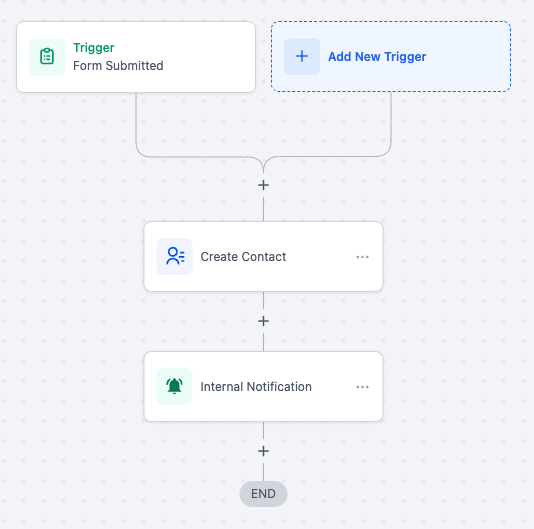
Automating Contact Creation from Web Forms
Scenario: A business wants to capture customer information from web form submissions and create or update contact records automatically. Action Setup:
- Action: Create Contact.
- Fields: First Name, Last Name, Email, Phone, City, Country. Outcome: The workflow creates or updates contact records in the CRM and notifies the sales team for follow-ups.
Updating Contact Records After Purchases
Scenario: When a customer makes a purchase, their CRM profile needs to be updated with transaction details. Action Setup:
- Action: Create Contact.
- Fields: Full Name, Email, Purchase History (Custom Field). Outcome: The workflow updates the customer’s profile with their latest purchase and tags them as “Active Customer.”
Lead Management from External Data Sources
Scenario: Leads from a third-party platform are imported into the CRM, and their records need to be created or updated automatically. Action Setup:
- Action: Create Contact.
- Fields: Business Name, Contact Source, Phone, Email. Outcome: The workflow ensures that all leads are accurately recorded in the CRM with relevant details, ready for follow-up.
Onboarding New Customers
Scenario: A subscription-based business wants to create a contact record for each new customer and assign them to an onboarding specialist. Action Setup:
- Action: Create Contact.
- Fields: First Name, Last Name, Subscription Tier (Custom Field), Email. Outcome: The workflow creates the contact record, assigns it to the onboarding team, and sends a welcome email.
Capturing Event Registrations
Scenario: Attendee information from event registration forms needs to be recorded in the CRM for tracking and communication. Action Setup:
- Action: Create Contact.
- Fields: Full Name, Email, Event Name (Custom Field). Outcome: The workflow creates contact records for all attendees and tags them with the event name for future engagement.
Frequently Asked Questions
Q. What happens if the contact already exists?
The Create Contact action updates the existing record with new information, ensuring data consistency and avoiding duplicates. Q. Can I use this action with custom fields? Yes, the action supports both standard and custom fields, allowing you to tailor contact records to your specific requirements. Q. How can I prevent duplicate records? The action uses matching criteria, such as email or phone number, to identify existing contacts and update their records instead of creating new ones. Q. Can this action be combined with other workflow actions? Absolutely. The Create Contact action integrates seamlessly with actions like “Send Email” or “Assign Task” to build comprehensive workflows. Q. Is it possible to notify teams when a contact is created or updated? Yes, you can add a notification action within the same workflow to inform relevant teams about the new or updated contact. Q. What triggers can we use with ‘Create Contact’ action? We recommend using it along with Inbound Webhook/Marketplace app Triggers.