
Full Circuit: How to Get More Leads & Close More Jobs for Electricians
If you’re already a Patient Copilot user, you’re familiar with the power of our platform. This guide is designed to help you maximize your Electrician business by getting more leads, closing jobs faster, and improving your online presence—all using Patient Copilot’s built-in tools. Whether you’re looking to optimize your Google Business Profile, enhance your website’s SEO, or track your lead generation efforts, we’ve got you covered. And if you find you need even more advanced capabilities, upgrading your account may be the next step toward success.
The Challenge for Electricians: Are You Leaving Money on the Table?
Even the best electricians can face hurdles when it comes to attracting a steady stream of high-quality leads. Common challenges include:
- Missing out on potential leads while juggling day-to-day work
- Difficulty tracking which marketing efforts yield the best results
- Prospects not following through after initial contact
- Relying solely on word-of-mouth referrals instead of a scalable system With Patient Copilot, you can address these challenges by automating lead follow-ups and enhancing your online presence.
Effortlessly Get More Leads & Close More Jobs
Imagine a system that fills your calendar, follows up with leads automatically, and helps you close more deals—all while you focus on the work you do best. This playbook is designed to help you get more jobs, close them faster, and maximize every opportunity—without wasting hours on phone calls, emails, and chasing customers.
What You’ll Learn in This Guide
- Optimizing Your Google Business Profile (GMB): Learn to claim, complete, and enhance your GMB for better local search performance.
- Improving Your Website for Local SEO: Discover how to use Patient Copilot’s website tools to create a fast, mobile-friendly site that captures leads.
- Boosting Your Google Rankings: Understand how to integrate local keywords and high-converting calls-to-action on your website.
- Building High-Quality Local Backlinks: Explore strategies to get featured on local directories and blogs to improve your credibility.
- Tracking Your Progress: Use Patient Copilot’s SEO and lead tracking dashboard to monitor your performance and fine-tune your strategy. You need to have a Patient Copilot account before you can get started: Sign Up Here
Step 1: Rank Higher in Google Local Search Results 1.
Claim & Complete Your Profile
- Ensure your business details—name, address, and phone number—are accurate and consistent with your website. Update your service areas, list your services, and set your hours of operation.
- [How to add or claim your Business Profile on Google](https://support.google.com/business/answer/2911778?utm_source=Patient Copilot+HelpDesk&utm_medium=organic)(https://support.google.com/business/answer/10515606?utm_source=Patient Copilot+HelpDesk&utm_medium=organic)
- [Complete your Business Profile on Google](https://support.google.com/business/answer/10515606?utm_source=Patient Copilot+HelpDesk&utm_medium=organic)
Enable Messaging and Text-to-Lead
- Connect your GMB to Patient Copilot. By switching your Google business phone number to a Patient Copilot call tracking number, you can receive text messages directly from potential clients.
- How to Purchase a Phone Number
- Connect Google Business Profile to Patient Copilot (https://support.google.com/business/answer/15013580?utm_source=Patient Copilot+HelpDesk&utm_medium=organic)
- [How to chat with customers from your Business Profile](https://support.google.com/business/answer/15013580?utm_source=Patient Copilot+HelpDesk&utm_medium=organic)
Automate Review Collection
- Leverage Patient Copilot’s review automation tools to send follow-up SMS and email requests after every job. More 5-star reviews can boost your rankings and build trust with new customers.
- How to Send Review Requests
- Reputation Management - How to Customize the Review Request Messages (SMS/Email)
- How to Dispute a Google Review and Check on the Dispute Status
Post Regular Updates
- Keep your profile fresh and engaging by scheduling regular posts via the Social Media Planner. Share job photos, service updates, and special promotions.
- How to use Social Posting with Google Business Pages
Step 2: Improve Your Website for Local SEO 1.
Create a Fast, Mobile-Friendly Site
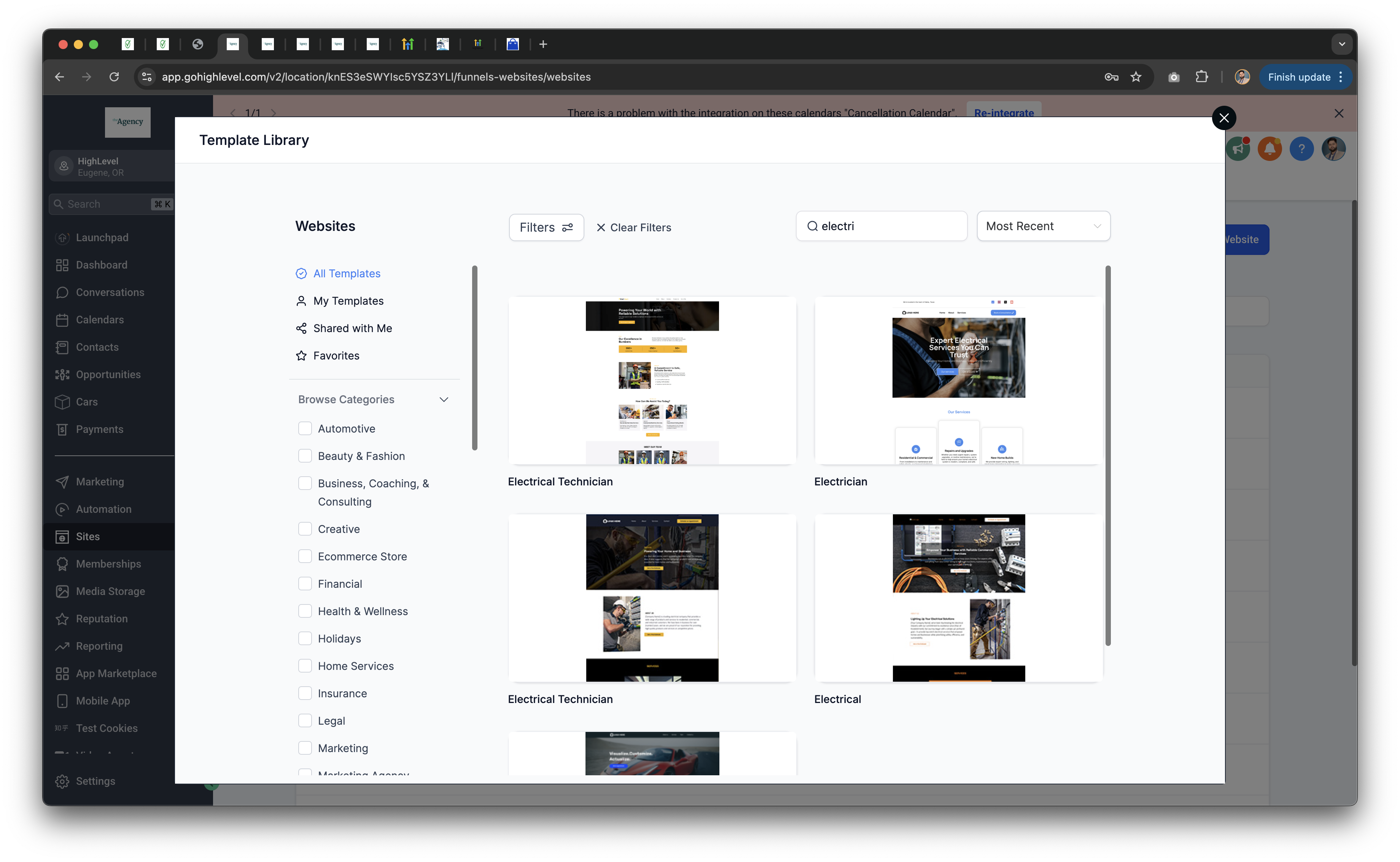
- Utilize Patient Copilot’s optimized website templates designed specifically for electricians. A fast-loading, responsive site not only looks professional but also improves lead capture. See our templates and examples here:
- Sites Overview
Optimize for “Electrician Near Me” Searches
- Incorporate your city and service areas into your website’s content, headers, and meta data. Use SEO capabilities in your website’s SEO section to update your details, such as the SEO Meta Data
Capture Leads Effectively
- Integrate Patient Copilot’s chat widget and customizable forms on your website. Offer incentives—like a free estimate or discount—to encourage visitors to share their contact details. For setup and customization, refer to these guides:
- Getting Started with Chat Widget
- How to Install Patient Copilot’s Chat Widget
- How to create a contact form in Patient Copilot?
- Show Popup on Entering Funnel/Website
- How to Create an Exit-Intent Pop-Up in Patient Copilot
Step 3: Optimize Your Website for Google Rankings 1.
Local Keyword Integration
- Enhance your homepage, service pages, and footer with targeted keywords such as “Top-Rated Electrician in [City]” or “Residential Electrical Services in [City].” Additionally, leverage Google’s “People Also Ask” feature to address common customer questions through your blog. -
How to Find High-Performing Keywords for Local SEO 2.
Increase Site Speed
- Remember that Google favors fast-loading websites. Use Patient Copilot’s website builder and optimization tools to ensure your site is speedy and user-friendly.
Incorporate High-Converting CTAs
- Place **“Call Now”**buttons and sticky booking forms on every page, especially for mobile users. These tactics can significantly boost your conversion rates.
- For guidance on setting up effective lead capture forms, check out: How to Set Up Lead Capture Forms That Convert
Step 4: Build High-Quality Local Backlinks 1.
Get Listed on Local Directories
- Submitting your business to platforms like Yelp, Angi, HomeAdvisor, and Thumbtack can enhance your online credibility. Also, consider joining local chamber of commerce websites to further boost your local presence.
Leverage Guest Posting Opportunities
- Offer expert advice—such as electrical safety tips or energy-saving recommendations—to local home improvement blogs. This strategy not only secures quality backlinks but also enhances your website’s authority.
Step 5: Track Your SEO and Lead Generation Performance 1.
Monitor Your Results
- Use Patient Copilot’s SEO & Lead Tracking Dashboard to keep track of:
- The number of calls and leads generated through Google - Growth in reviews and engagement on your Google Business Profile - Which pages and keywords are driving the most traffic
Continuously Improve Your Strategy
- Regularly review your performance data to fine-tune your tactics. This ongoing process ensures that your efforts lead to more jobs and a higher ROI.
Final Thoughts: Get More Electrician Jobs
By optimizing your Google Business Profile, improving your website, generating more reviews, and building local backlinks, you’ll rank higher on Google—and win more jobs without spending on ads.
Next Steps: Take Your Business to the Next Level
By optimizing your Google Business Profile, enhancing your website for local searches, and continuously tracking your progress, you’re setting your business up for sustained growth. If you find that your current plan doesn’t provide access to these advanced features, consider upgrading your Patient Copilot account. Upgrading unlocks additional automation and analytics tools that can further streamline your lead generation and help you close more jobs. ✅ Automate everything—reviews, SEO tracking, lead follow-ups. ✅ Improve your website speed & lead capture. ✅ Monitor rankings & adjust strategy as needed. Start ranking higher today—Sign up with Patient Copilot and automate your SEO for long-term success! Was this article helpful? That’s Great! Thank you for your feedback Sorry! We couldn’t be helpful Thank you for your feedback Feedback sent We appreciate your effort and will try to fix the article