
How To Build Courses / Membership Sites
[
](https://community.patientcopilot.ai/courses/offers/a79d58bf-4d8d-4842-9efd-2194329404f5) (Click the image above to access the course) Learn how to build Patient Copilot Memberships/Courses websites by clicking here, which will take you to the course page (If already logged into Patient Copilot University).
Access from Patient Copilot University
Here’s a clear, step-by-step guide to access the course 1. From Agency View, click University in the left sidebar. 2. Select Go to Patient Copilot University. This will open the Patient Copilot University group in a new browser tab. 3. In the top navigation menu of the Patient Copilot University group, click Learning. 4. Locate the course The Course Creator’s Playbook and click Open to begin.
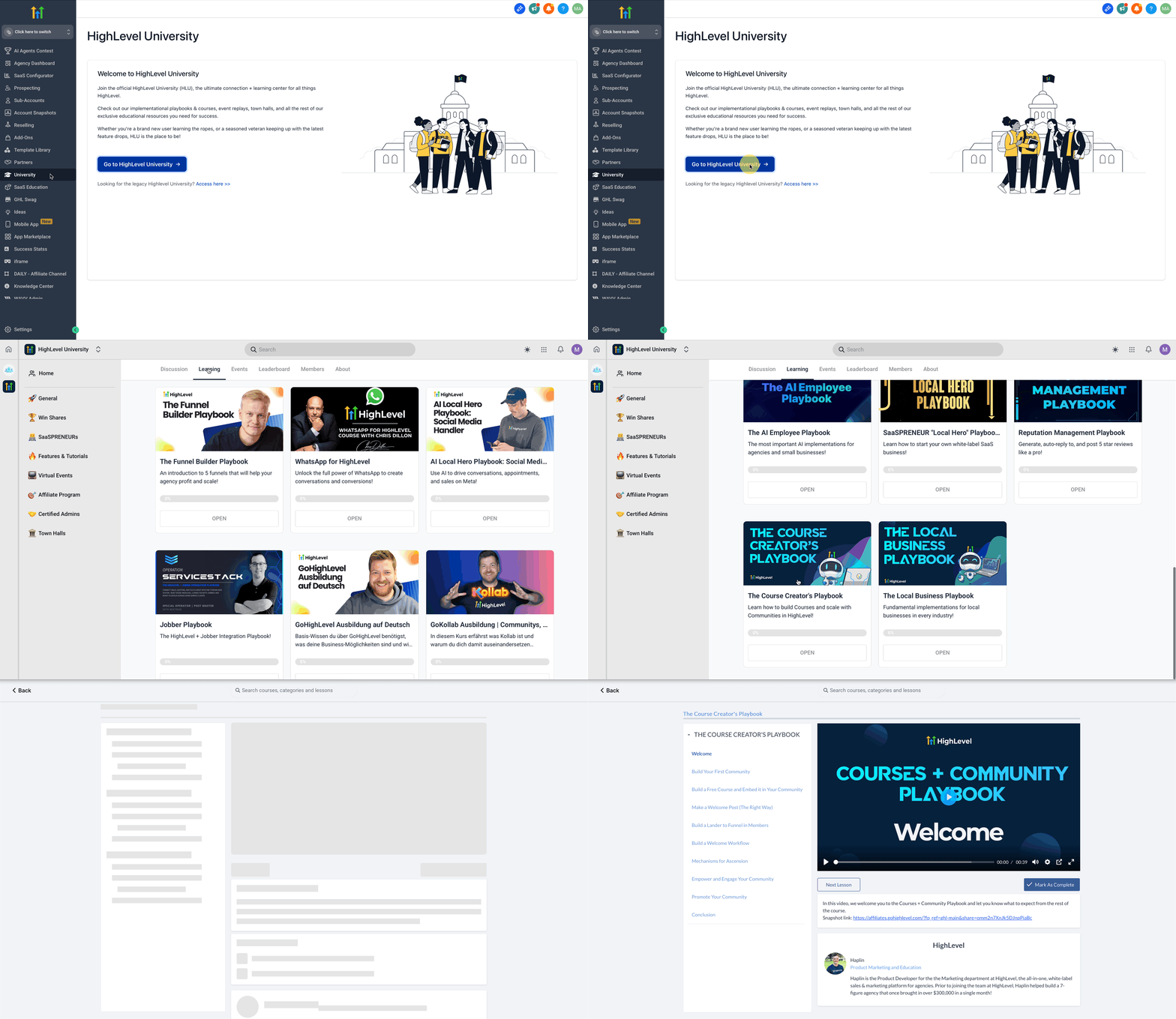
This comprehensive video course will walk you through exactly how to create courses and build offers around those courses so you can efficiently get your courses launched. Note: Videos have a size limit of 4GB Was this article helpful? That’s Great! Thank you for your feedback Sorry! We couldn’t be helpful Thank you for your feedback Feedback sent We appreciate your effort and will try to fix the article