
Workflow Action – Add Associated Records to Workflow
Overview The Add Associated Records to Workflow action allows users to automatically add records that are associated with the trigger object into another workflow. The Add Associated Records to Workflow action is available in all workflow types — Contact-based, Company-based, and Custom Object-based workflows. It allows users to automatically add records that are associated with the trigger record into another workflow. This action extends the functionality of the existing Add to Workflow action. While Add to Workflow only adds the current record (e.g., a contact) to another workflow, Add Associated Records to Workflow enables enrolling associated records (Contacts, Companies, or Custom Objects) based on an association label.
Action Name Add Associated Records to Workflow
Action Description This action enables workflow users to:
- Select an object type.
- Choose an association label that determines which associated records will be picked. (does not apply to company - contact assocaitions) - Enroll those associated records directly into another workflow. This action is possible only after creating custom objects (or using contacts) in the subaccount and ensuring that an association label exists between the trigger record and the associated records.
Action Details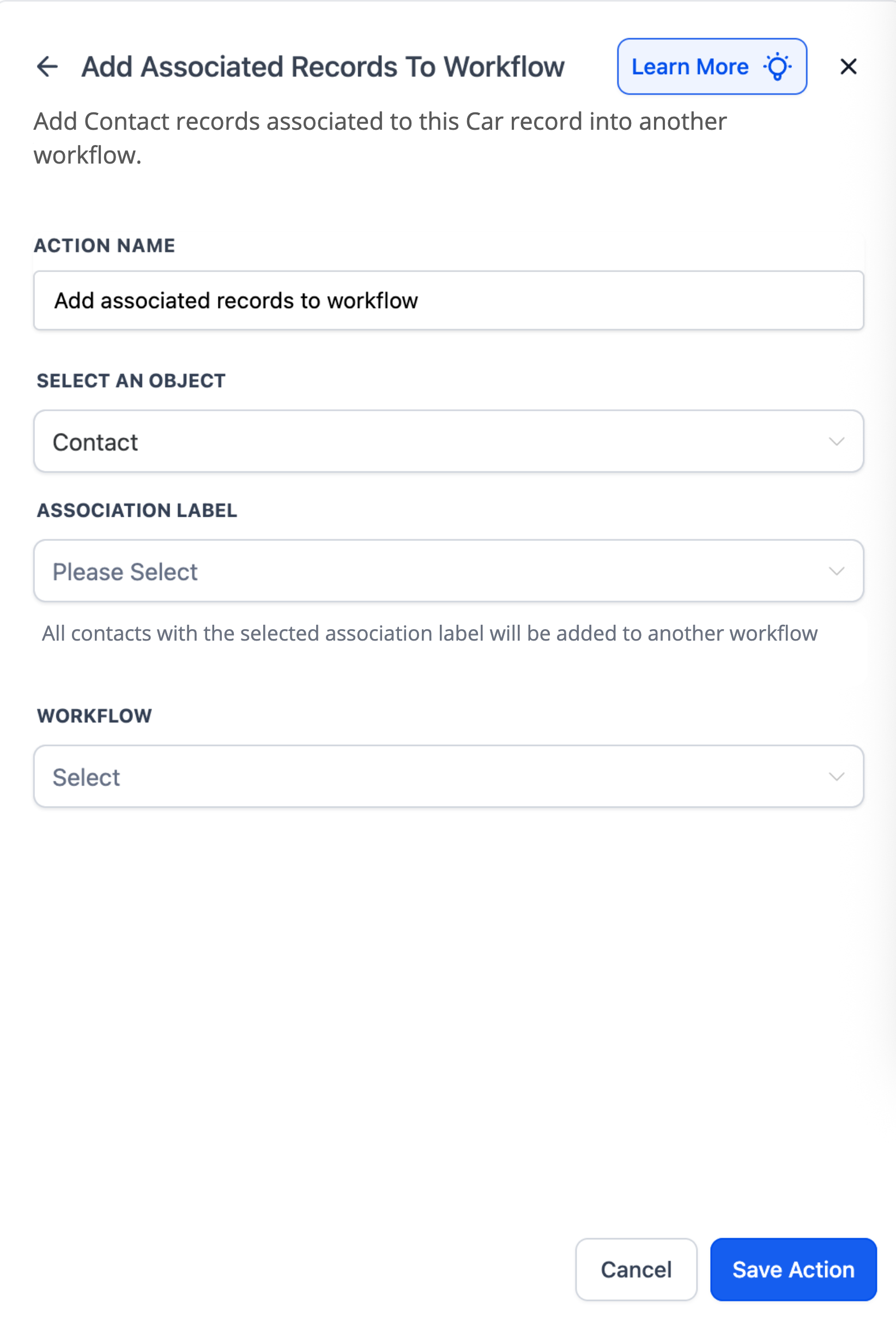
- Select an Object: Choose which type of record should be added.
- Association Label: Required dropdown. Defines which associated records will be included.
- Workflow: Select the workflow to which the associated records will be added.
Examples
Example 1: Car ↔ Dealer (Custom Object Workflow)
An automotive CRM has Cars associated with Dealers. When a Car record is updated to status = Ready for Sale, the workflow automatically adds all associated Dealers (under the Assigned Dealer label) into a Dealer Notification Workflow. Setup
- Object → Dealer
- Association Label → Assigned Dealer
- Workflow → Dealer Notification Workflow How It Works 1. A Car record is updated to Ready for Sale. 2. The action finds all associated Dealers under the label Assigned Dealer. 3. Each Dealer is enrolled in the Dealer Notification Workflow, where they receive automated alerts.
Example 2: Contact ↔ Contact (Contact Workflow)
A university manages Contacts for both students and guardians. When a new semester starts, the workflow automatically adds all Parent Contacts (associated under the Parent-Child label) into a Semester Start Notification Workflow. Setup
- Object → Contact (Parent)
- Association Label → Parent-Child
- Workflow → Semester Start Notification How It Works 1. A Student Contact record triggers the workflow at the start of the semester. 2. The action finds all associated Parent Contacts under the Parent-Child label. 3. Those Parents are enrolled in the Semester Start Notification Workflow, ensuring they receive timely updates.
Example 3: Company ↔ Contact (Company Workflow)
A marketing agency manages Companies and their associated Contacts. When a Company record is added to the VIP Client Program, all associated Contacts are automatically enrolled in a VIP Communication Workflow. Setup
- Object → Contact
- Workflow → VIP Communication Workflow How It Works 1. A Company record is updated with a new status (VIP Client). 2. Those Contacts are enrolled in the VIP Communication Workflow to receive VIP-only updates.