
Customizing Review Widgets in Reputation
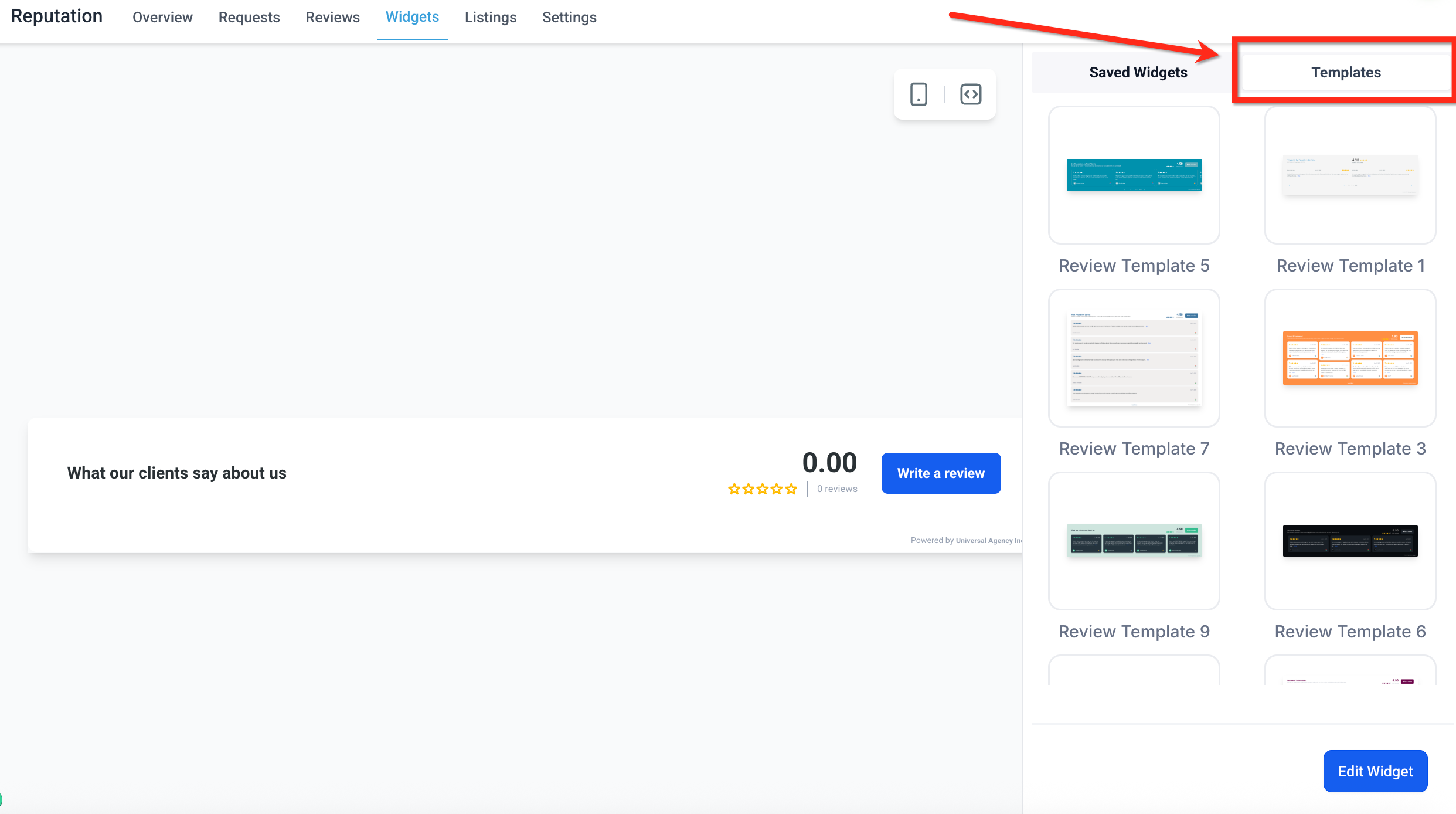
This article will guide you through how to set up, customize, and embed Review Widgets. These widgets let you showcase real reviews from customers directly on your site—boosting trust, improving conversions, and enhancing your brand image. * * * * * * ## Templates Templates allow you to launch a beautifully styled review widget in seconds. These pre-built designs are especially helpful if you want a professional layout without manually customizing every element. Applying a template is quick and easy! 1. Click the Templates tab at the top-right of the widget panel. 2. Browse the list of available designs and click on any template to instantly apply that design to your review widget. Once applied, you can continue customizing the widget just like any other—adjust layout, colors, fonts, or content to make it your own. Just click the blue Edit Widget button.!(https://assets.patientcopilot.ai/bfff4c584e2505b0.png) * * * ## Frequently Asked Questions Q: Can I embed multiple different review widgets on one website? Yes, but not using the “Review” block in the builder, which always displays your default widget. To embed multiple widgets in the same site, use the “Embed Code” option to copy the code for the desired widget. Then add the widget’s code to your website using a “Code” block. Make sure you are using the dropdown to select the correct widget when copying the code. Repeat this for each widget you would like to add to the site. Q: W****ill my widget update automatically when I receive new reviews? Yes. The widget syncs with connected platforms such as Google and Facebook. New reviews will automatically appear in the widget based on the filters and display settings you’ve configured. Q: Do review widgets work on non-Patient Copilot websites? Yes. Review widgets can be embedded on almost any website platform. Simply copy the Embed Code from the widget and paste it into a custom code block on your external site. Q: Can I continue editing a widget after I add it to a site? Yes. You can edit the widget at any time—even after it’s embedded. Changes you make in the widget builder (like layout, content, or styling) will automatically update on your site once you save the widget. Q: Are the review widgets mobile responsive? Absolutely. All review widget templates and layouts are fully responsive and automatically optimized for mobile, tablet, and desktop viewing. * * * ## Related Articles - **(https://help.patientcopilot.ai/en/support/solutions/articles/48001222767)**(https://help.patientcopilot.ai/en/support/solutions/articles/48001222767)[Reputation - Breaking Down the Reputation Overview Dashboard](https://help.patientcopilot.ai/en/support/solutions/articles/48001222767)
- Reputation Management: Personalize Recurring Emails with Custom Templates
- Reputation - Breaking Down the Reviews Tab
- Getting Started with Reviews AI Agents
- Reputation Management - How to Customize the Review Request Messages (SMS/Email)(https://help.patientcopilot.ai/en/support/solutions/articles/48001222767)**(https://help.patientcopilot.ai/en/support/solutions/articles/48001222767)**