
What is email Bounce Suspension, and How to avoid it
Email Deliverability Email Sending Suspended for High Bounce Rate What triggers a suspension, how long it lasts, what to do right now, and how to prevent it from happening again. What You’ll Learn Email providers and anti-spam networks monitor bounce rates for every email you send and use that information to suspend sending for accounts with high bounce rates. High bounce rates directly hurt your email deliverability. This article covers what bounces are, what causes an account suspension, how to fix a hard bounce and reactivate the account, and the best practices that prevent it happening again. 1
What Are Bounces?
A bounce occurs when an email is not delivered, or is rejected, by the recipient’s email provider. There are two types: Hard Bounce The recipient address does not exist, or the domain is invalid. Hard bounces are permanent — do not retry these addresses. Soft Bounce A temporary failure — the recipient server is down, the mailbox is full, or the message was too large. Soft bounces can resolve on their own, but repeated soft bounces become a problem. 2
What Causes an Account Suspension Bounce rate thresholds are monitored continuously. If your bounce rate exceeds the industry threshold (below 5%), we temporarily suspend email sending for the account. A high bounce rate signals that the account is sending emails to invalid addresses, or that external spam filters are refusing delivery due to past sending behavior. A healthy bounce rate is typically in the range of 0–3%. Good to Know During an email-sending suspension, only outbound sending is disabled. All other features in the account continue to work normally. 3
The Bounce Block System Blocks escalate in three stages. The first two are 12-hour temporary blocks; the third is permanent and requires Support to lift.
| Bounce Rate | Action | Duration | Block Level |
|---|---|---|---|
| 3% | Warning email sent | Immediate notification | Pre-block warning |
| 5% | Email sending suspended | 12 hours | 1st block |
| 3% (after 1st block) | Critical warning email sent | Immediate notification | Pre-2nd block warning |
| 5% (after 1st block) | Email sending suspended | 12 hours | 2nd block |
| 3% (after 2nd block) | Final warning email sent | Immediate notification | Pre-3rd block final warning |
| 5% (after 2nd block) | PERMANENT SUSPENSION | Permanent | 3rd block — FINAL |
Requesting a Permanent Email Unblock Permanent unblocking cannot be automated. It requires a manual review by the Support team. Step 1 Contact Support Open a ticket with the Support team to start a review request. Step 2 Share the required details In your request, clearly include:
- Subaccount ID
- Screenshot or confirmation of the error message — for example, “Email sending is blocked due to a high number of spam blocks from email providers.” Step 3 Submit the ticket Submit and wait for the Support team to review. What Happens Next The Support team will review your sub-account, including:
- Email sending history
- Bounce rate and spam complaint rate
- List acquisition methods and sending practices Outcome A: Email sending may be unblocked. Outcome B: Additional remediation steps may be required before reinstatement. Note Approval is not guaranteed and depends entirely on compliance with email best practices. 5
What Should You Do Now?
When a sub-account is suspended, the sub-account email address receives an alert. From that point, take the steps below: Action 1 Clean your contact list with Email Verification Run your contacts through the Email Verification Service to eliminate addresses that are unverifiable or non-existent and would ultimately bounce. Action 2 Pause bulk sends if this is a client account If the sub-account belongs to a client, discuss the situation with them and advise that they not send bulk communication or cold email campaigns until the issue is resolved. Important Not following the recommended remediation measures may result in restrictions on email capabilities for the location. If Complaint, Unsubscribe, or Hard Bounce rates continue to deteriorate, the sub-account may be blocked. 6
How to Prevent Future Suspensions
The location should be able to send emails 24 hours after you receive the non-compliant email notification. There isn’t currently a way to easily locate the remaining recipients who didn’t get the email before sending was blocked. The workaround: export the email statistics, reupload to tag the contacts who did receive it, then use a Smart List to filter for contacts without that tag and re-send. Learn more about Email Statistics. Tip If you don’t want to receive these notification emails, change your user role from agency admin to user.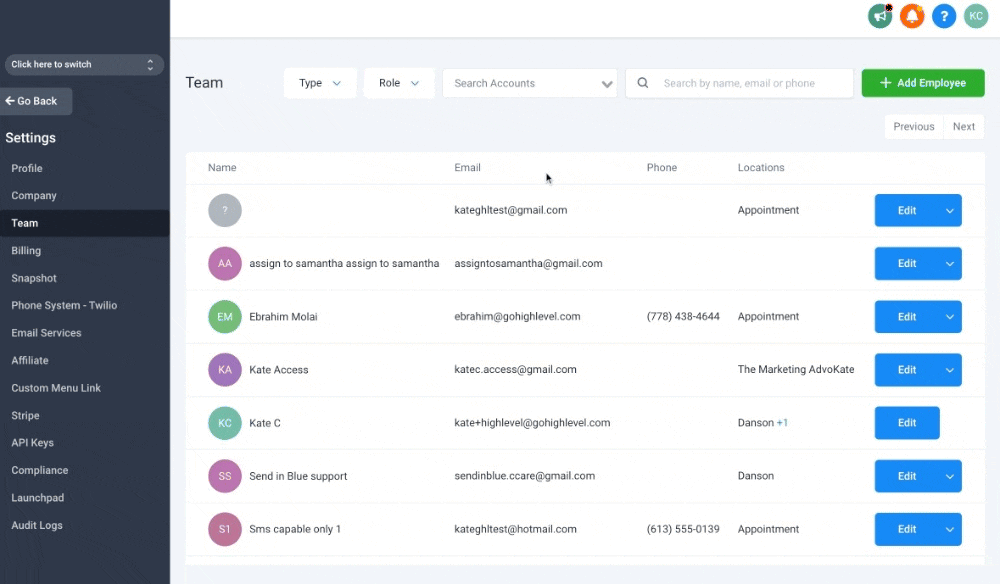 Best Practices Six things to do to keep your account healthy Each one materially lowers the risk of hitting a suspension threshold. 7
Email Best Practices Best Practice 1 Email Verification
If your contacts were imported earlier, verify all existing contacts before sending. Bounced emails will be marked as invalid and won’t be picked up by campaigns, bulk sends, or workflows. From the agency view: Sub-accounts → click the sub-account name → scroll to Enable Re-verification for 90 days.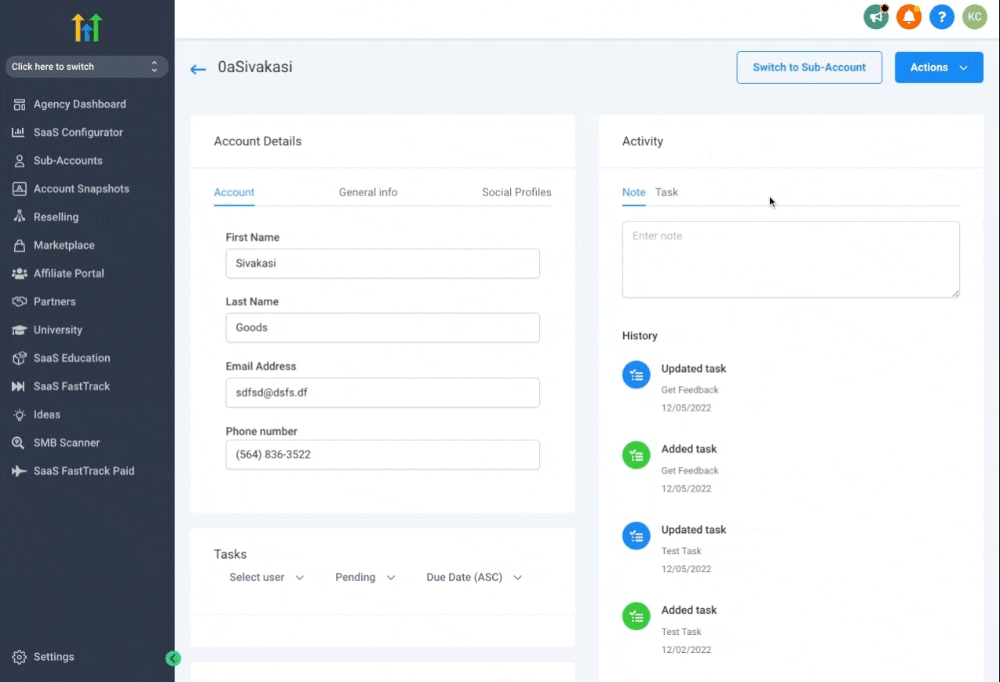 Best Practice 5 Set up double opt-in Include a consent checkbox on your sign-up forms. Example wording: Sample Consent Text By providing your name and contact information, you are expressly consenting to receive communications from COMPANY_NAME or one of their licensed agents, which may include phone calls (including to any wireless number that you provide, including via automatic telephone dialing systems or artificial/pre-recorded messages), text messages, and/or emails for marketing insurance products and services including health, Medicare, and life insurance plans. By providing your information, you understand that your consent is not a condition of the purchase of any product or services, and carrier messaging and data rates may apply. You may revoke this consent at any time by calling us at 1-800-000-000 or emailing us at EMAIL_HERE to be placed on our do-not-call list. 8
Frequently Asked Questions
Q: What’s a healthy bounce rate? 0–3% is the healthy operating range. At 3% you’ll receive a pre-block warning email. At 5% sending is suspended. Q: How long does a temporary block last? Both the 1st and 2nd block are 12 hours each. You can resume sending sooner by enabling email verification. A 3rd block within the same window is permanent and requires Support to lift. Q: Does the suspension affect other features? No. Only email sending is paused. SMS, calls, workflows, calendars, and every other feature continue to operate normally. Q: What is the Email Verification Service and how does it help? It runs every contact’s address through a validation check — syntax, domain, mailbox existence, catch-all detection — and marks invalid ones so they’re excluded from campaigns, bulk sends, and workflows. That keeps your bounce rate well below the suspension threshold. Q: Can I appeal a permanent block? Yes — open a Support ticket with your sub-account ID and a screenshot of the error. Reviews are manual and approval is not guaranteed; it depends on whether your account is now in compliance with email best practices. Q: Can I tell which contacts didn’t receive my email after a block? Not directly. The workaround is to export the email statistics, re-upload to tag the contacts who did receive the email, and then use a Smart List to filter to contacts without the tag for re-sending. Q: How do I stop receiving the suspension alert emails? Change your user role from agency admin to user. Only agency admins receive the suspension notifications. Q: My bounce rate is fine now — can I resume sending right away? Wait for the 12-hour temporary block to lift, or enable the Email Verification Service to resume sooner. After lifting, ramp up volume gradually and segment to your most engaged contacts first. Was this article helpful? That’s Great! Thank you for your feedback Sorry! We couldn’t be helpful Thank you for your feedback Feedback sent We appreciate your effort and will try to fix the article