
Workflow Action – Find Object Record / Find Company
Overview The Find Object Record action searches your CRM for a specific custom object record using values from an Inbound Webhook trigger. You map fields from the webhook payload to the object’s fields. If your workflow already started with the same object as the trigger, this step is skipped. This action is also available in company-based workflows as Find Company, allowing you to locate a company record using webhook values (e.g., companyName, domain).
Action Name
- Find Object Record (for custom object workflows) - Find Company (for company-based workflows)
Action Description Use this action to:
- Look up a record (custom object or company) by mapping webhook parameters to object/company fields in Filters.
- Resolve multiple matches using a tie-breaker (Earliest Created / Latest Created).
- Branch on Record Found vs Record Not Found for clean, deterministic flows. Prerequisite: An Inbound Webhook trigger must exist in the workflow. The action reads values from this trigger’s payload (body, headers).
Action Details
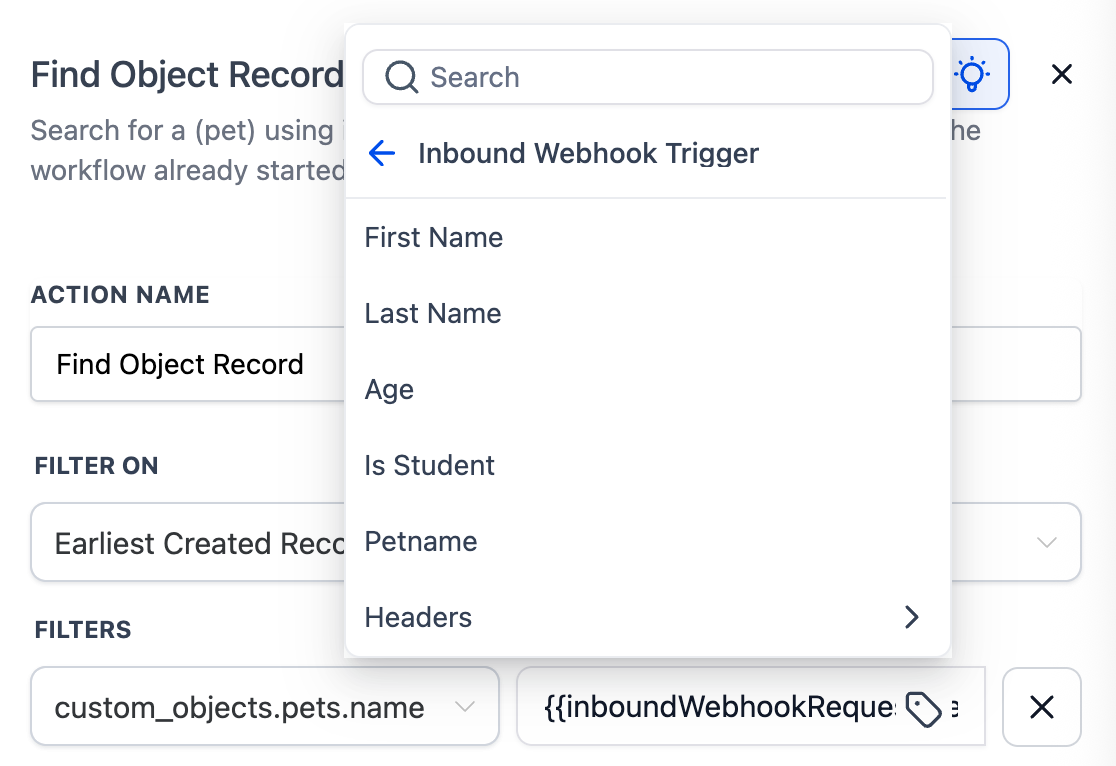
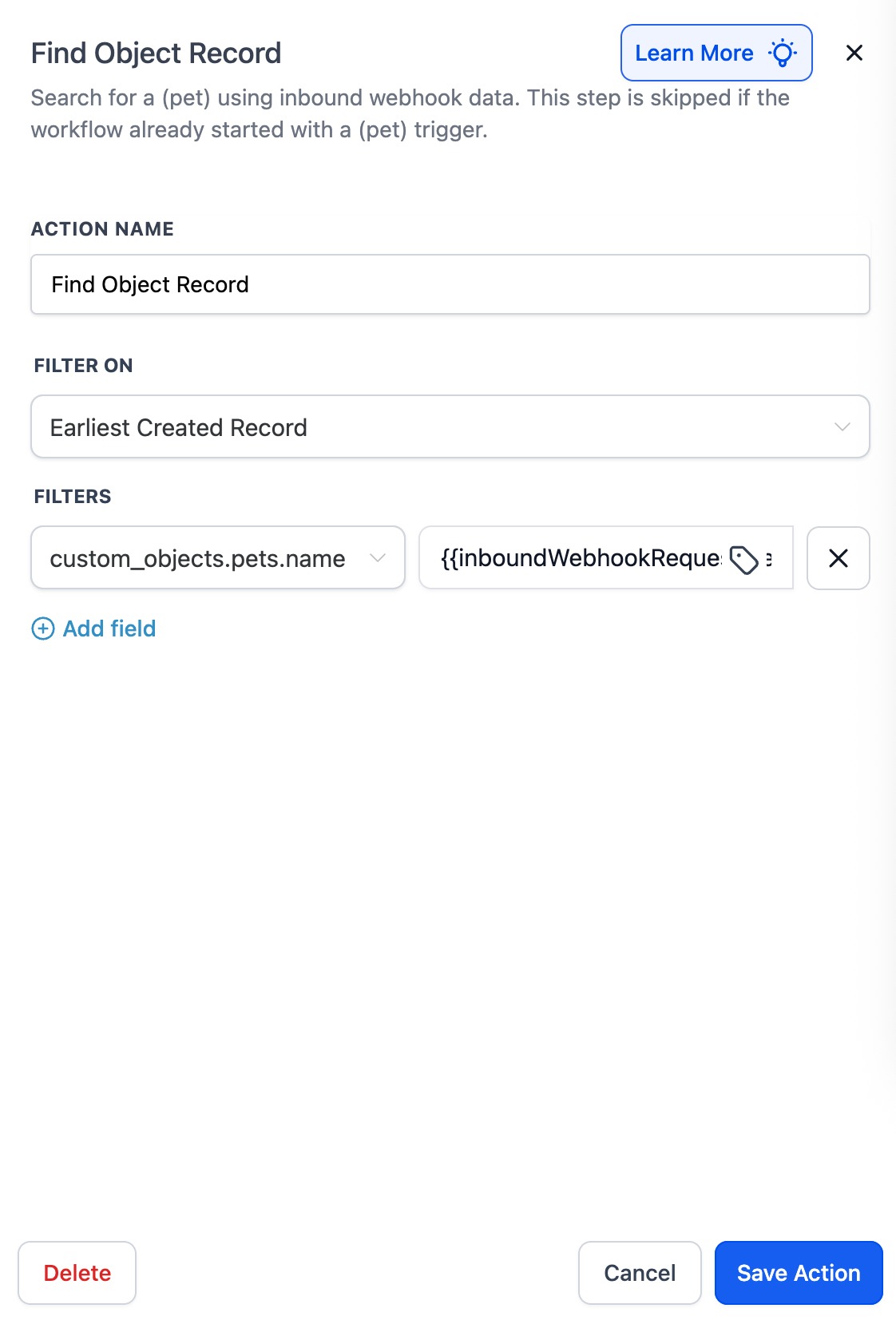
I. Requires Inbound Webhook - Enabled only when the workflow contains an Inbound Webhook trigger.
- Values are taken from that trigger’s payload (e.g.,
{{inboundWebhookRequest.body.petname}},{{inboundWebhookRequest.body.domain}}). II. Filter On (tie-breaker) Choose how to select one record if multiple match: • Earliest Created Record • Latest Created Record III. Filters (AND logic) - Add one or more rows. All filters use AND logic. - Left side: Object/Company field to match (e.g., Record ID, External ID, VIN, Pet Name, Company Name, Domain).
- Right side (value): Pick a field from the Inbound Webhook trigger (Body, Headers) or type a fixed value.
- Tips: • Prefer unique identifiers (Record ID, External ID, Domain) for deterministic results. • Add extra filters (status, location, type) to avoid ambiguous matches. IV. Outcomes
- Record Found: The matched object becomes the current record for downstream actions (Update, Associate, Clear, etc.).
- Record Not Found: Use this branch to create a new record, alert a user, or stop the flow. V. Skip behavior - If the workflow already starts with the same object as its trigger (e.g., “Car created” or “Company created”), this step is skipped automatically. VI. Best Practices - Ensure the webhook sends clean, typed values (strings/numbers/booleans).
- Normalize casing/whitespace in the source system if you match on names.
- Test with sample payloads in a staging workflow before going live.
Examples
Example 1: Find a Pet by Name (webhook → lookup)
Goal: A webhook posts petname = "snowy". Find the Pet object with that name. Setup
- Filter On: Earliest Created Record
- Filters: - Pet Name =
{{inboundWebhookRequest.body.petname}}Flow 1. Inbound Webhook triggers with{ "petname": "snowy" }. 2. Action finds Pet where Pet Name equals snowy. 3. Record Found: Update Pet status and notify the owner. 4. Record Not Found: Create a Pet record with name = “snowy” and tag for review.
Example 2: Find a Subscription by External Reference
Goal: Your billing webhook sends subscription_ref. Find the Subscription object. Setup
- Filter On: Latest Created Record
- Filters: - External Reference =
{{inboundWebhookRequest.body.subscription_ref}}- Status = active (optional safety filter) Flow 1. Webhook arrives withsubscription_ref. 2. Action selects the latest active Subscription with that reference. 3. Record Found: Update plan fields; enqueue renewal emails. 4. Record Not Found: Create a placeholder Subscription and alert Finance.
Example 3: Find a Company by Domain
Goal: A webhook from a lead-gen form passes companyDomain. Find the Company record with that domain. Setup
- Filter On: Latest Created Record
- Filters: - Domain =
{{inboundWebhookRequest.body.companyDomain}}Flow 1. Inbound Webhook triggers with{ "companyDomain": "acme.com" }. 2. Action finds Company where Domain equals acme.com. 3. Record Found: Enroll Company in an “Onboarding” workflow. 4. Record Not Found: Create a new Company record with domain acme.com. Was this article helpful? That’s Great! Thank you for your feedback Sorry! We couldn’t be helpful Thank you for your feedback Feedback sent We appreciate your effort and will try to fix the article