
How to Send a Certificate After Passing a Quiz or Assignment
You can automatically issue a certificate when a learner completes (passes) a quiz or an assignment in your course. Follow the steps below to configure this using the Workflow Builder.
✅ Overview
This guide walks you through setting up an automation that triggers the issuance of a certificate once a user completes a specific quiz or assignment in your course. You’ll use the Lesson Completed trigger with filters and then add an Issue Certificate action.
⚙️ Step-by-Step Instructions
1. Add the Trigger - In your workflow, click Add Trigger.
2. Apply Filters To issue the certificate only for the intended quiz or assignment, apply the following filters:
- Product → Select your Course
- Category → Choose the module/section where your quiz lives
- Lesson → Select the specific quiz or assignment
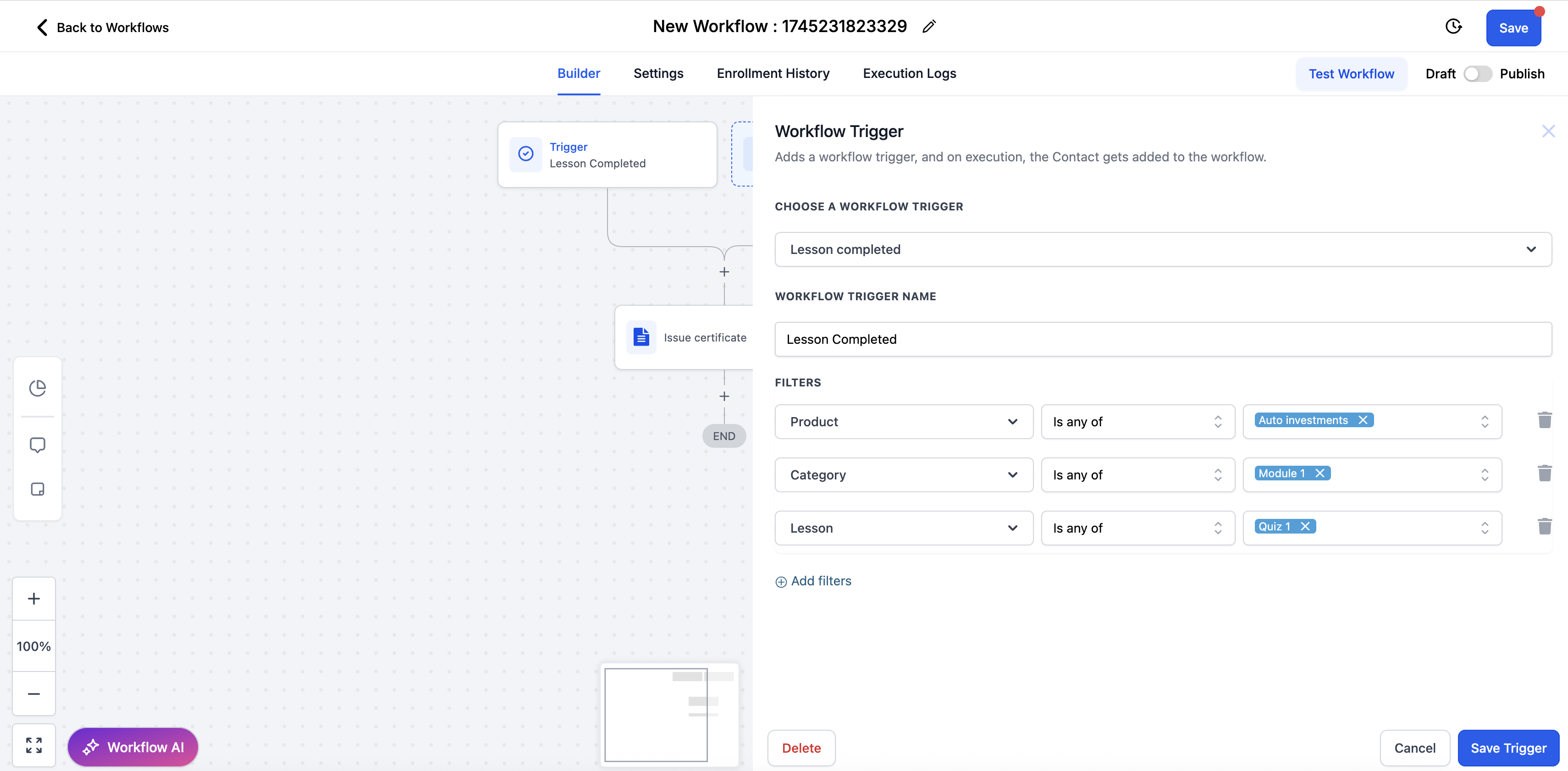
3. Add the Certificate Action - Click the + icon under the trigger.
- Select Issue Certificate from the list of actions.
- Select the certificate template of your choice. You’re done! The system will now automatically send a certificate when the selected quiz/assignment is passed. Was this article helpful? That’s Great! Thank you for your feedback Sorry! We couldn’t be helpful Thank you for your feedback Feedback sent We appreciate your effort and will try to fix the article