
Authorize.net integration for processing payments
This article will show you how to integrate Authorize.Net with your Patient Copilot account to process payments seamlessly. By connecting Authorize.Net, you can manage customer transactions, accept payments through various methods, and ensure a smooth checkout experience. This integration supports payments for invoices, order forms, and subscriptions, providing a unified payment processing solution.
What is Authorize.Net Integration?
The Authorize.Net integration allows you to securely process payments in your Patient Copilot account using Authorize.Net as your payment gateway. With this integration, you can accept Card Payments for invoices, order forms, and subscriptions. Authorize.Net provides a trusted, reliable, and secure way to handle customer transactions and manage payments directly from within your CRM. Whether you’re running a small business or managing multiple clients, this integration simplifies the payment collection process, making it easier to track and manage your revenue streams.
Key Benefits of Authorize.Net Integration
- Secure Payment Processing: Authorize.Net ensures that all transactions are protected with advanced security protocols, keeping customer data safe. 2. Supports Multiple Payment Methods: Accept payments via credit cards, giving your customers more flexibility. (More methods coming soon) 3. Streamlined Invoicing and Order Forms: Seamlessly process payments for invoices, subscriptions, and order forms without the need for manual intervention. 4. Real-Time Payment Tracking: Track and manage payments directly from your Patient Copilot dashboard for better financial oversight. 5. Improved Customer Experience: Provide your customers with a professional and efficient checkout experience.
How To Set Up Authorize.Net Integration
- Obtain Your Authorize.Net API Credentials:
- Log in to your Authorize.Net account.
- Navigate to Account Settings > API Credentials & Keys.
- Generate your API Login ID and Transaction Key.
- Connect Authorize.Net to Patient Copilot:
- In Patient Copilot, go to Settings > Payments.
- Click Add Payment Gateway and select Authorize.Net.
- Enter your API Login ID and Transaction Key.
- Test the Connection:
- After entering your credentials, perform a test transaction to ensure the integration is working correctly.
- Enable Payment Methods:
- Once connected, configure which payment methods (e.g., credit card) you want to enable for your invoices, order forms, and subscriptions.
- Start Processing Payments:
- Use Patient Copilot to create invoices, order forms, or subscriptions, and start collecting payments via Authorize.Net.
Frequently Asked Questions
Authorize.Net is considered a competitive payment processor due to its reliability, security, and wide range of features. It has operated for over 20 years, providing payment processing services to businesses of all sizes. Authorize.Net provides robust security measures to protect transactions, sensitive customer information, and reliable uptime to ensure smooth transactions. Additionally, Authorize.Net offers features such as recurring billing, mobile compatibility, and integrations with popular e-commerce platforms.,
Covered in this Article
Which Payment Processor to use?
Requirements to use Authorize.Net
How to integrate Authorize.Net as a Payment Gateway?
Side Notes for using Authorize.Net
Test cards for Authorize.net integration.
FAQ
Why don’t I see PayPal among the default gateway options?
What will change in the reporting of transactions done with Authorize.net? Where will I be able to keep track of all payments?
Where will I be able to find the subscriptions created via Authorize.net? I cannot relate to the subscription status defined on the Subscriptions page.
How do I Cancel/End a subscription created via Authorize.net? I am not able to do so in the merchant portal.
Will I be able to refund transactions as well within the application itself?
I am using FDS filters with Authorize.net to hold transactions for review if the address is not submitted, the card code is not submitted, etc. Is the system compatible with handling those cases?
When will Authorize.net be available for invoices/Text2Pay/Calendar payments/memberships and other areas?
Which Payment Processor to use?
Deciding between Stripe, PayPal, and Authorize.net will depend on what’s best for your business. Here’s a comparison: Stripe: A popular choice for online businesses and startups, Stripe offers a developer-friendly platform, custom integrations, and transparent pricing. PayPal: PayPal is a well-established payment processor with a global presence and a wide range of features, including a secure payment gateway, invoicing, and recurring payments. Authorize.net: Authorize.net is a trusted payment processor with a long history of providing reliable and secure payment processing services. It offers comprehensive features, including fraud detection and mobile compatibility. Ultimately, the best choice depends on the specific needs of your business, such as the types of payments you need to accept, your target market, and your budget. It’s recommended to compare each processor’s features, fees, and support options before deciding. Please Note: The data for fees is accurate as of when this article is being published, for more information please check out the Pricing pages of the three options listed: Stripe: https://stripe.com/gb/pricing Paypal: https://www.paypal.com/us/webapps/mpp/merchant-fees Authorize.net: https://www.authorize.net/en-us/sign-up/pricing.html
Authorize.net can accept transactions from United States, Australian, and Canadian merchants. Currencies supported with Authorize.net
- Link Before you can integrate Authorize.Net, you must confirm whether you are on a browser that supports using it. Below is a list of supported and tested browsers:
You can check and verify the browser and version you are using by: Use the below help/about information when inside the respective browser: Chrome Edge Firefox Safari Utilize sites like: https://www.whatsmybrowser.org/ https://www.whatismybrowser.com/ For the Merchant Interface inside Authorize.net, if an unsupported browser or version is detected, two possible messages may display depending on how low the browser version is., Browser Warning/Out of Date – In this case, Authorize.net may have detected a browser/version that you may encounter issues with. You should update to a newer version or use a different supported browser. Examples of Outdated browsers: Internet Explorer (IE) 11 Edge (Legacy) OperaBrowser Name
Recommend Version
Chrome
v80 or higher
Edge (Chromium)
v85 or higher
Firefox
v78 or higher
Safari
v12 or higher
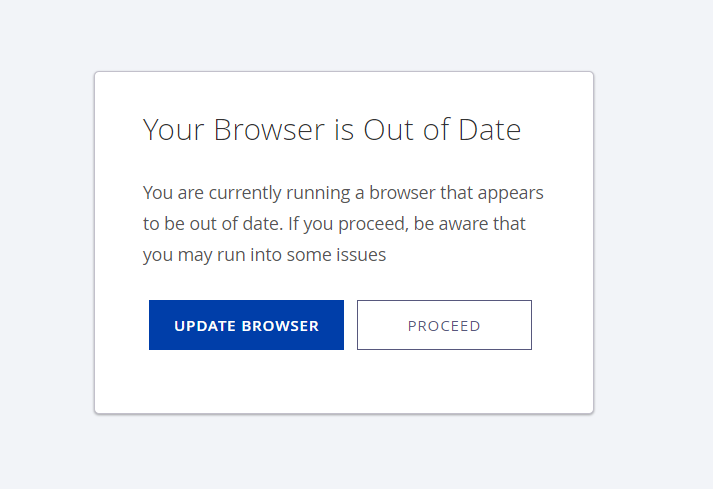
Browser Block/Out of Date – In this case, we have detected a browser/version that will encounter issues, and an updated browser version needs to be used or a different supported browser.
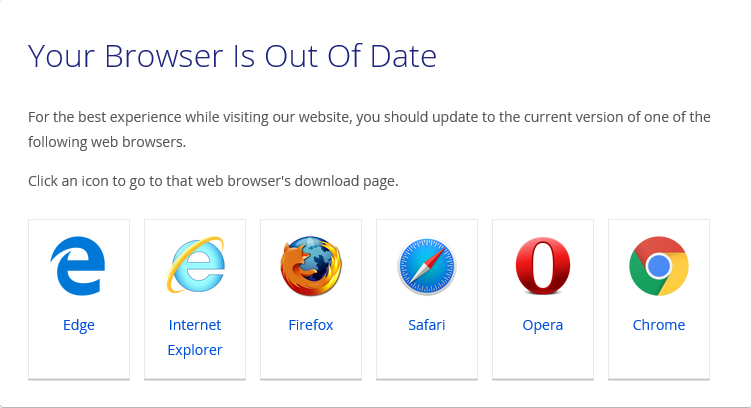
How to integrate (https://authorize.net/)Authorize.Net as a Payment Gateway?
1. Once you are sure you are using a supported browser and that you are operating from within one of the supported countries, you will need to acquire Live and Sandbox API keys from Authorize.net For sandbox API keys, log into the sandbox Merchant Interface. For Live API keys, log into the Live Merchant Interface. Click Here for more details on Sandbox vs. Live Mode in Authorize.Net.
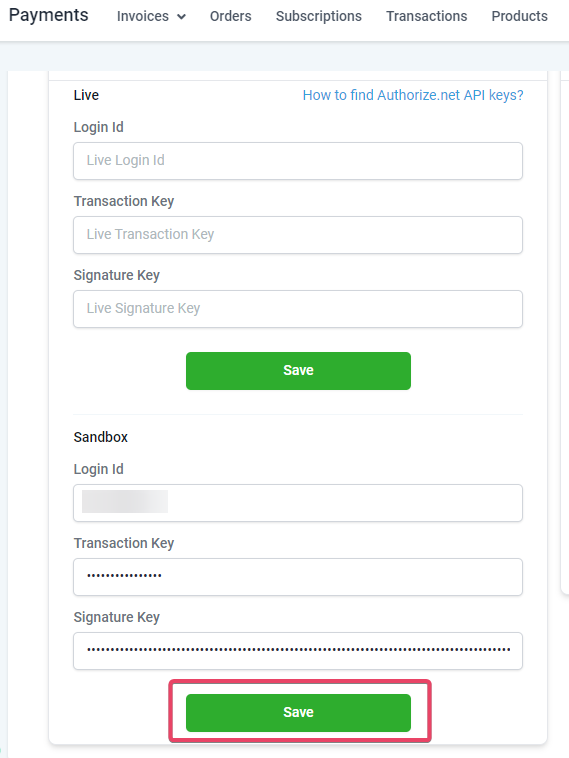
2. Then you can proceed to **Payments> Integrations>**Drop the 3 API Keys you got from your Merchant Interface in Authorize.Net. You can input the Live API Keys in the Live fields.
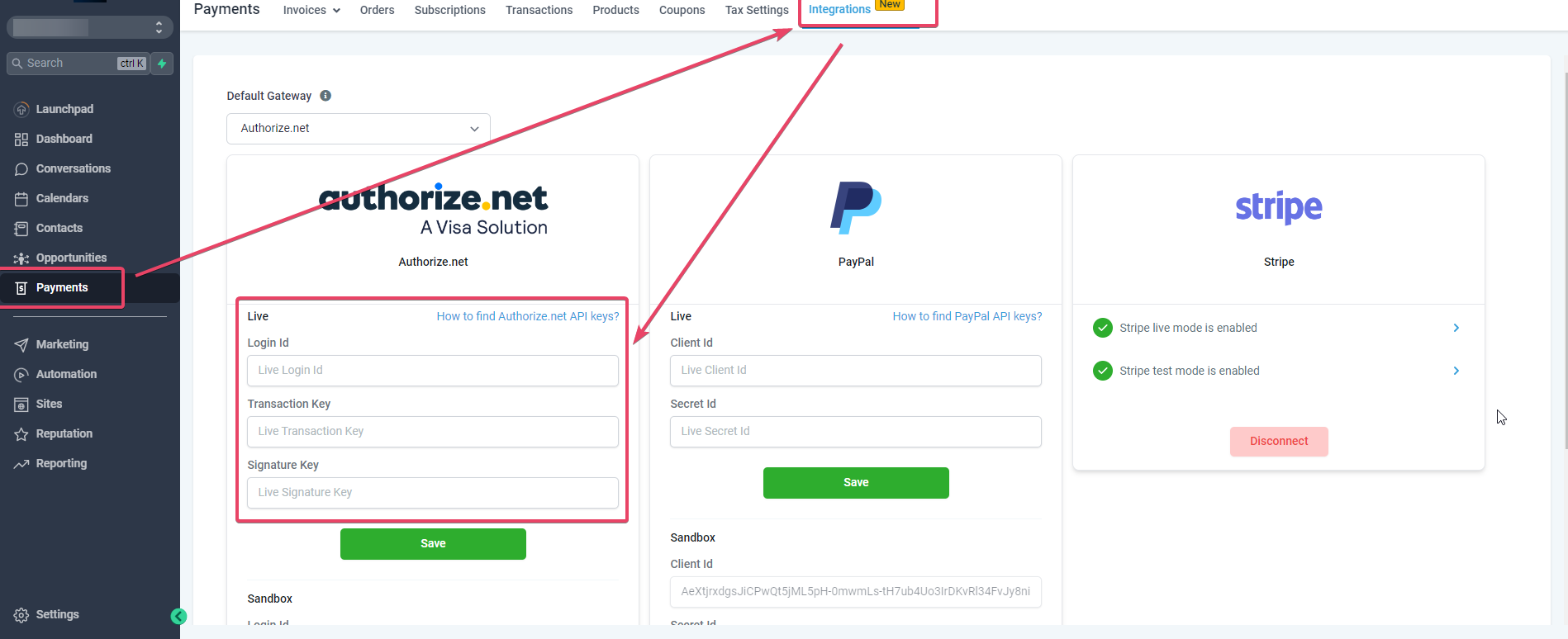
And you can input the Sandbox API Keys in the Sandbox Fields.
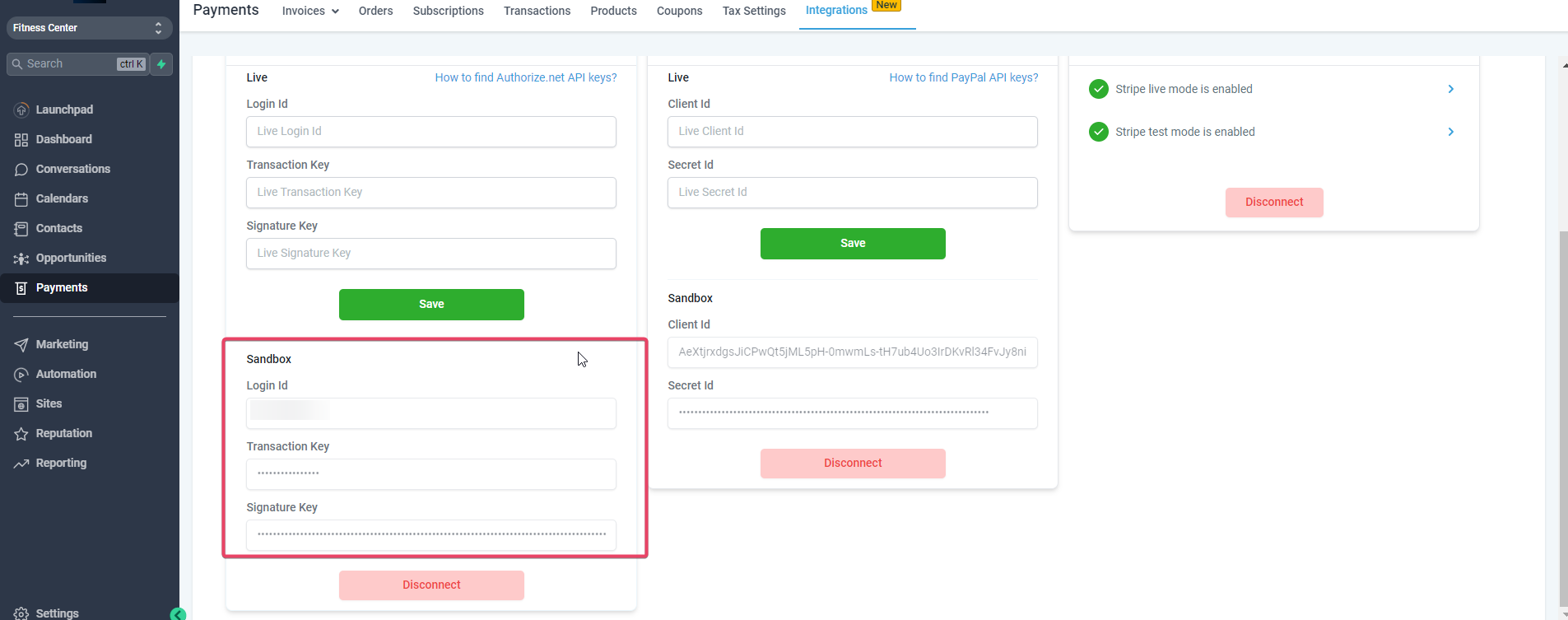
Once you have input the desired API Keys, click on the Save Button.
3. It will show you a quick prompt asking whether you want to make (https://authorize.net/)Authorize.Net (https://authorize.net/) your Default Payment Gateway.
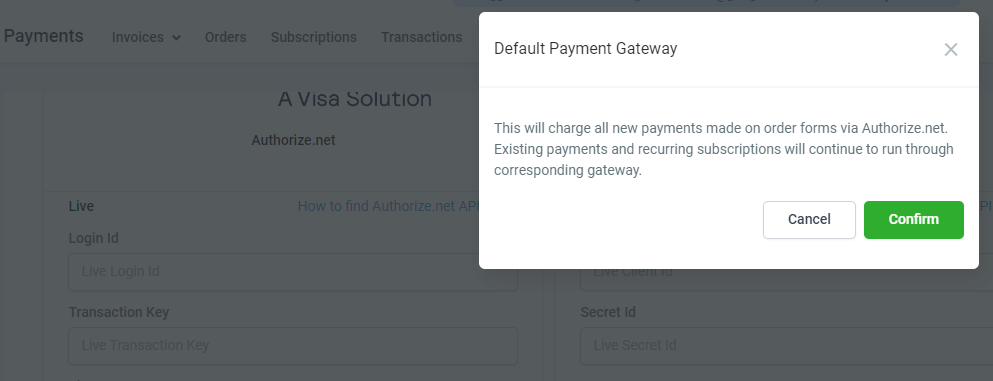
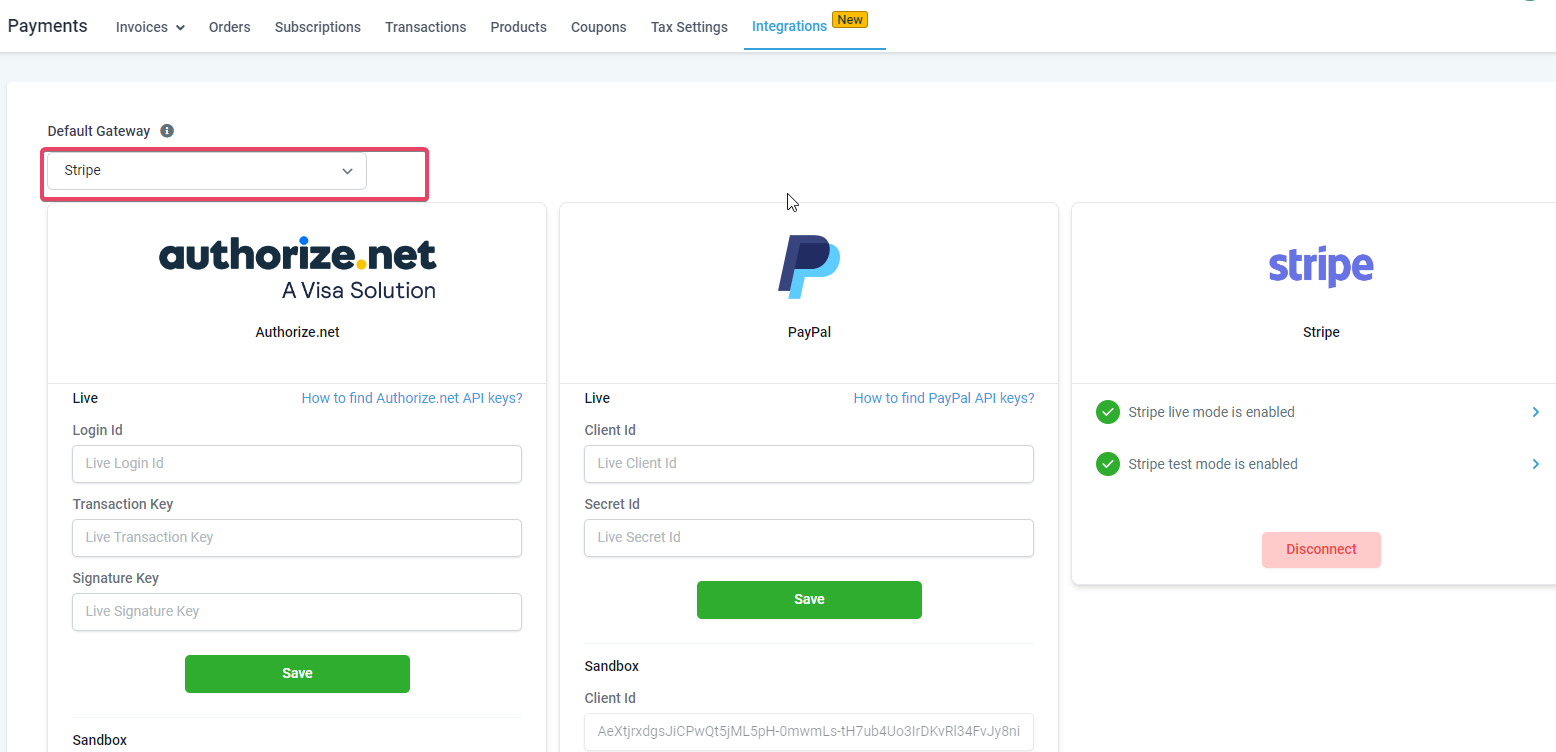
Clicking on Cancel will still integrate (https://authorize.net/)Authorize.Net but will not make it the Default Gateway.
Clicking on Confirm will integrate (https://authorize.net/)Authorize.net(https://authorize.net/) and make it the Default Payment Gateway.
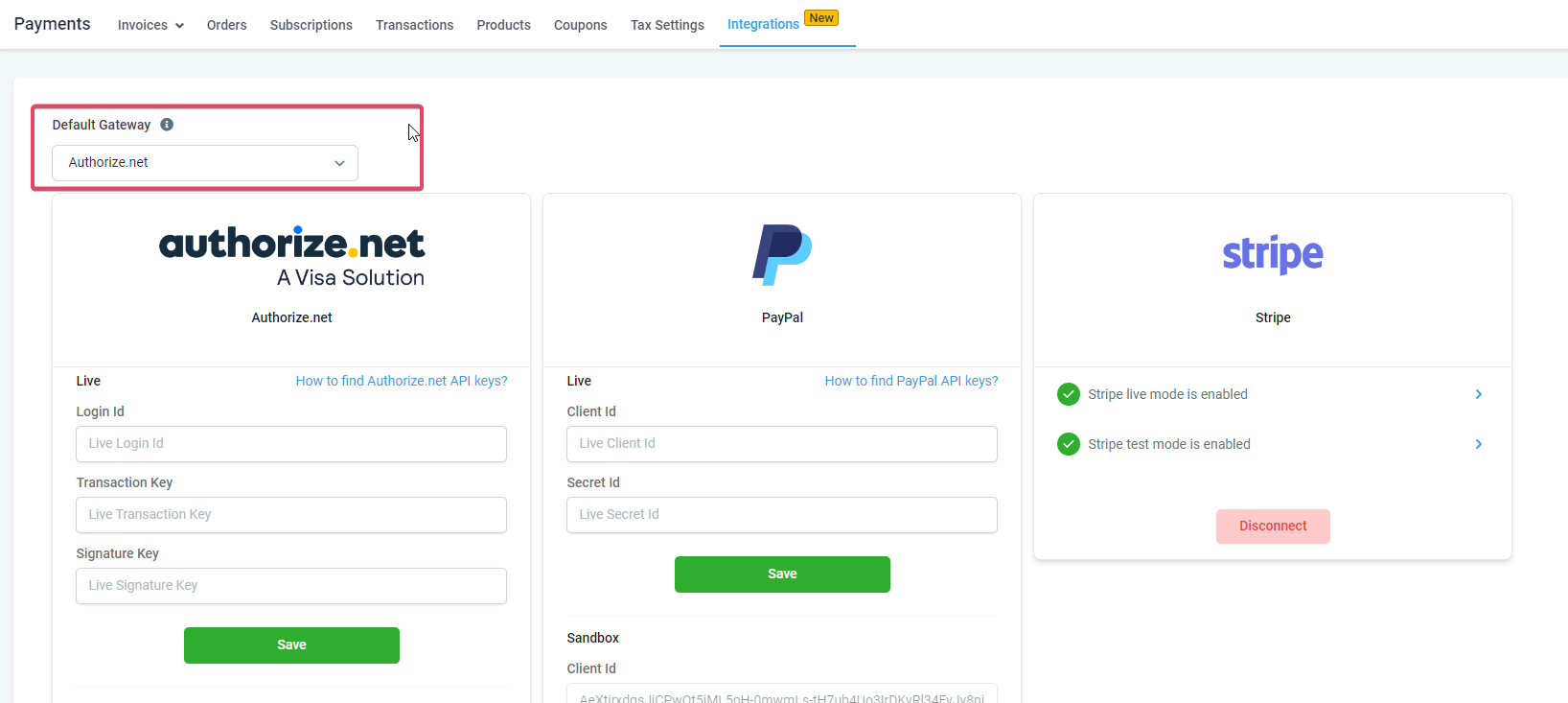
Please Note You are not required to disconnect Stripe to connect to Authorize.net. You can connect to both gateways on the integrations page. However, since you have connected two different gateways for processing payments, you will need to define a default gateway for processing payments. PayPal will continue to function alongside Authorize.net/Stripe in order forms, whichever is set as the default
Side Notes for using Authorize.Net
If Authorize.net is connected and set as the default gateway, other product areas like memberships and SAAS payment links will continue to process payments using Stripe. If there are recurring subscriptions/pending transactions with Stripe, they will continue to run as is until the Stripe connection is in place. We encourage you not to disconnect any gateway. Defining the default gateway will run new transactions through the desired choice and keep the existing subscriptions running through Stripe and PayPal integrations in place. Please Note: You need to upgrade to funnels version 2 to make use of this feature. Click here for the link to (https://authorize.net/)Authorize.Net(https://authorize.net/)‘s FAQ section.
Test cards for Authorize.net integration.
Expiry Date can be any future date, and any 3/4 digits value can be the CVC: 4007000000027 (Visa) 4012888818888 (Visa) 4111111111111111 (Visa) 370000000000002 (American Express) 5424000000000015 (Mastercard) 2223000010309703 (Mastercard) 2223000010309711 (Mastercard) 6011000000000012 (Discover) 3088000000000017 (JCB) 38000000000006 (Diners Club/ Carte Blanche)
FAQ
Why don’t I see Paypal among the default gateway options?
You can connect to Paypal and use it as a payment method alongside a credit card payment method using Stripe/Authorize.net. This means the default has to be chosen among Stripe/Authorize.net when connected. PayPal can be used independently and alongside credit card payment methods on order forms. and
What will change in the reporting of transactions done with Authorize.net? Where will I be able to keep track of all payments? There will be no change in the Orders/Subscriptions/Transactions reporting. All the payments done via Authorize.net will be available under Payments ➝ Transactions.
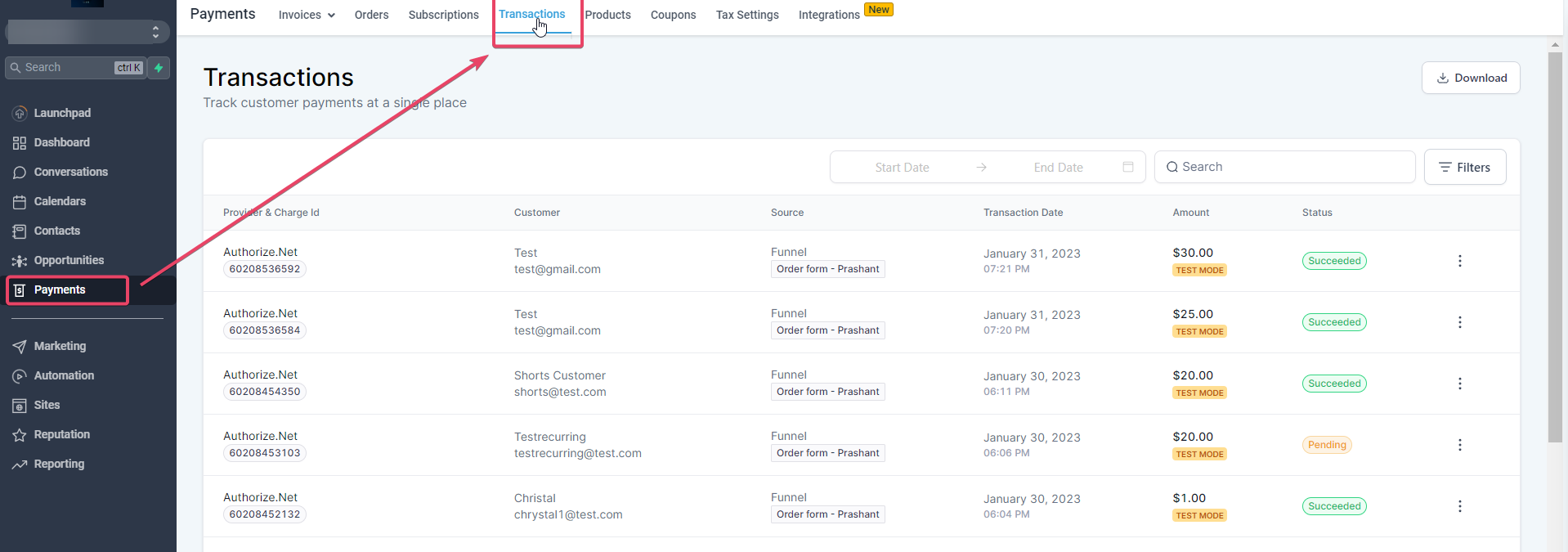
Also, there will be no change in the functioning of workflow triggers/attribution associated. All the functionalities will work the same with Authorize.net.
Where will I be able to find the subscriptions created via Authorize.net? I cannot relate to the subscription status defined on the Subscriptions page. All subscriptions created on the order forms can be tracked under Payments ➝ Subscriptions.
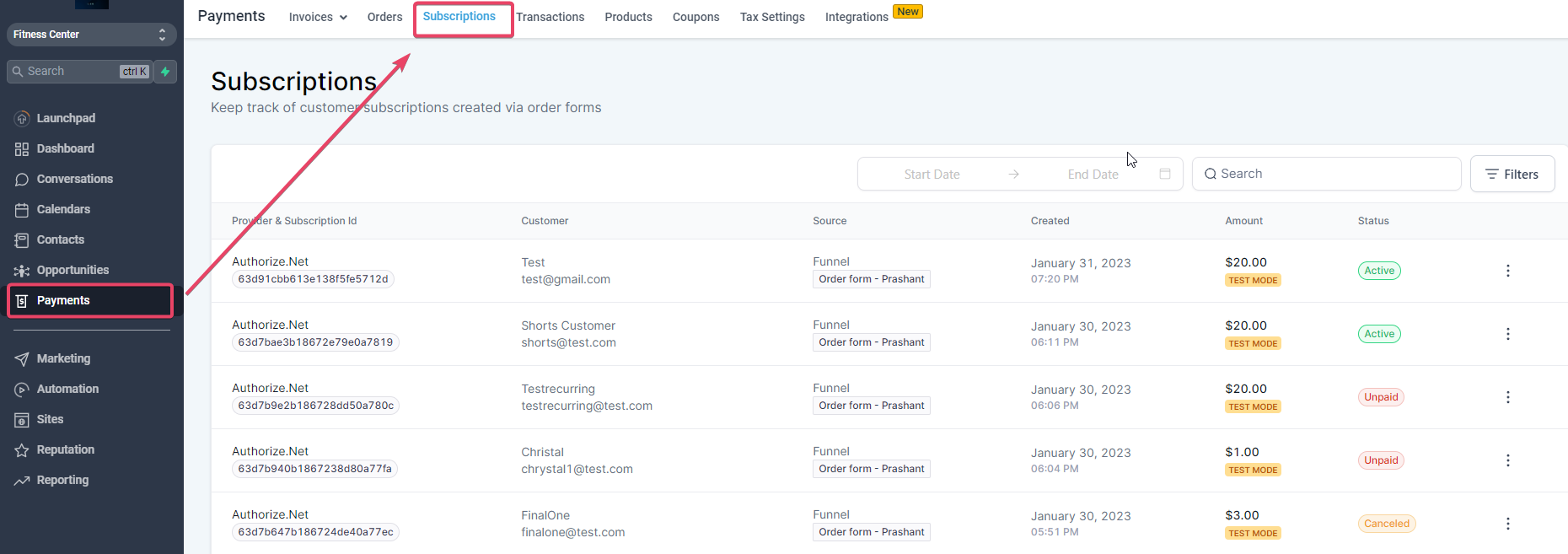
The following list represents subscription statuses and their inferences: Pending - When held for merchant review due to FDS Trial - Subscription is in trial mode Active - Last payment was made, and there is an upcoming payment as well Expired - All the subscription payments have been completed, and the subscription no longer exists Canceled - The merchant canceled the subscription using the Cancel action, and no further payments are to be processed. Unpaid - The last payment for the subscription was not paid successfully. The subscription is ongoing, but the final payment was unsuccessful. Cancellation will be possible for the subscriptions according to the status:
Status | Cancel |
| Pending | No |
| Trial | Yes |
| Active | Yes |
| Expired | No |
| Canceled | No |
| Unpaid | Yes |
- The subscription will remain active until every recurring payment is made successfully for the subscription and will move to “Expired” after the completion of payments.
- If the credit card expires for the end customer in the middle of the subscription, the payment requires authentication from the end customer, or the last payment didn’t go through successfully; the status will move over to “Unpaid.” - The payment will be attempted two more times after 24 hrs each. The status will remain “Unpaid.” - The subscription will remain in the Unpaid state and will attempt the following subsequent transactions, each with two retries.
- The next subsequent payment will also be attempted, and if any payment becomes successful, the subscription will move into “Active.” Else will stay with “Unpaid” status.
- The subscription status will move to “Expired” after all the retries have been made for the last transaction.
- If the merchant disconnected the gateway account and there is an ongoing subscription, the transaction cannot be processed; hence the subscription will move to unpaid. The retry attempts will continue according to the retry logic.
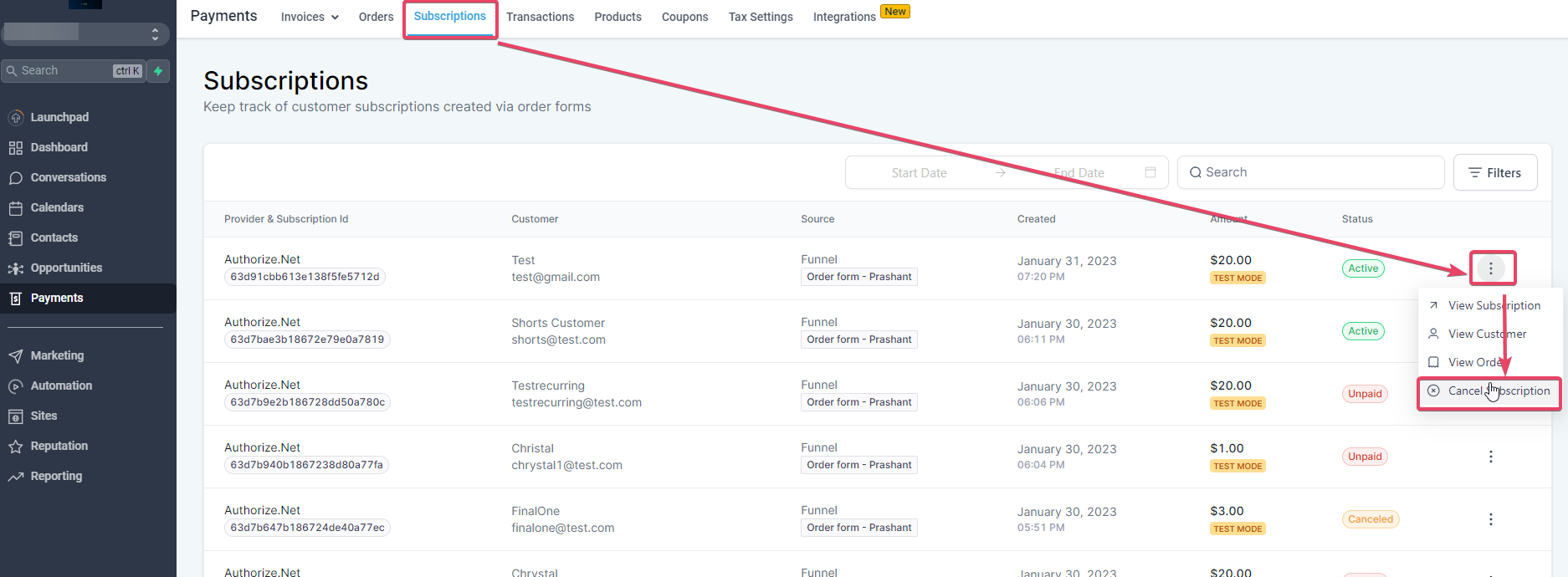
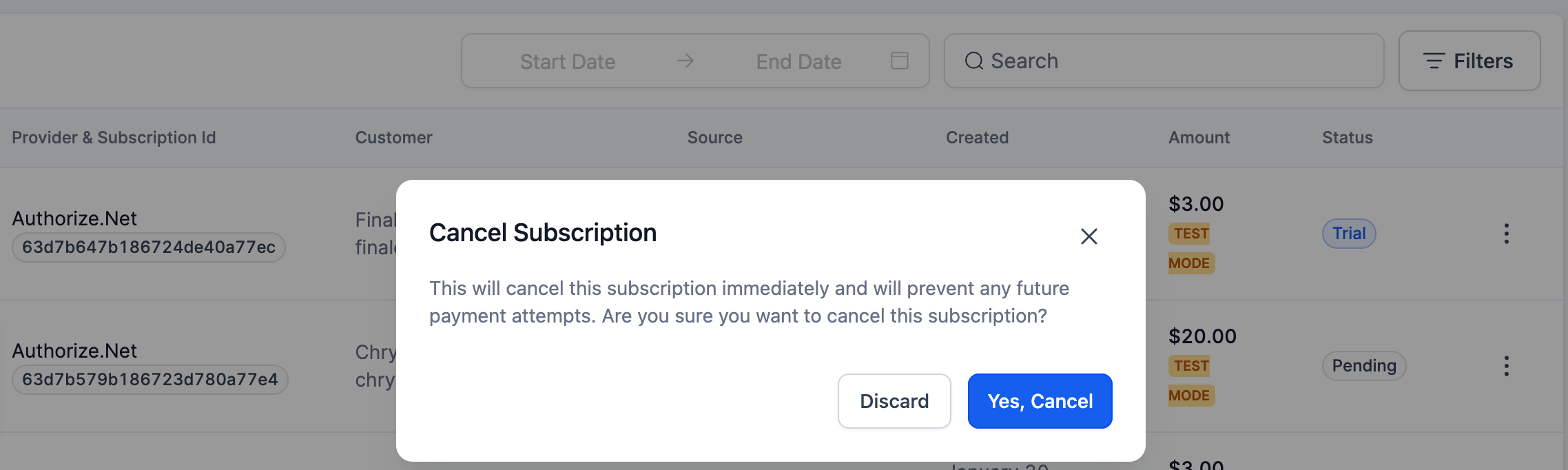
How do I Cancel/End a subscription created via Authorize.net? I am not able to do so in the merchant portal.
Subscriptions created using Authorize.net can be canceled within the Subscriptions page using the ‘Cancel Subscription’ Action.
Will I be able to refund transactions as well within the application itself?
Yes, we have the refund functionality within the application. You can refund any transaction under Payments - > Transactions
I am using FDS filters with Authorize.net to hold transactions for review if the address is not submitted, the card code is not submitted, etc. Is the system compatible with handling those cases? Yes, If you hold transactions submitted on order forms for review based on FDS filters. In that case, your transaction will be held for review (or declined as per the setting that you have configured) and will be visible in your merchant portal. Additionally, the corresponding status will be updated on the Transactions page. When you approve or decline the transaction. Regarding recurring invoice payments/calendar appointment booking payments, we treat the transaction as declined and do not book the calendar appointment or schedule the auto payment, since it introduces complications regarding when the business owner will approve the payment.
Does Authorize.net work for membership checkouts?
Yes, Authorize.net is available for membership checkouts
When will Authorize.net be available for SaaS?
It is now available under SaaS v2 functionality